Last Updated on October 18, 2026 at 1:28 pm
NaviPlan is a privacy-first, local-only portfolio tracker and goal planner developed by Naviran Technologies in association with freefincal. We have covered its multi-asset tracking and goal-based investing features before. The tool has now released version 1.6.0 “Seamount”, and the headline addition is a significant one: a dedicated Tax Center. This is a major update for DIY investors, as it brings the complex task of capital gains management into a single, integrated interface. Alongside it, a new Total Net Worth card gives you a complete view of your financial standing.
The Tax Center: A Significant Update for DIY Investors
Taxation of mutual funds in India is complex. It depends on the fund category, your holding period, the date of purchase, and your income slab. Most investors manage this with spreadsheets or rely on their CA at the end of the year. NaviPlan’s new Tax Center aims to change that by making capital gains management an ongoing, integrated part of your portfolio review.
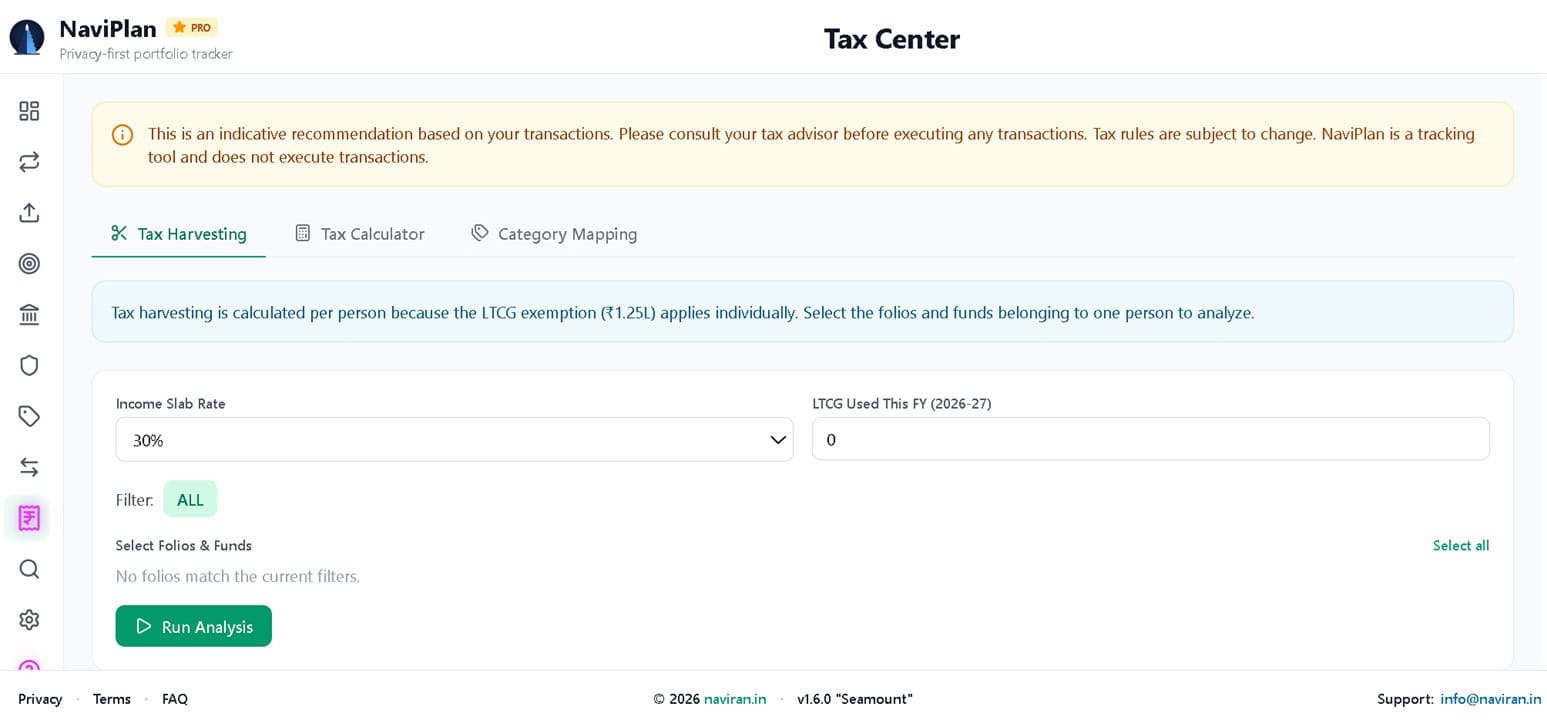
The Tax Center has three main sections.
1. Tax Harvesting Recommendations
Tax harvesting is the practice of selling investments to book losses or utilise the annual LTCG exemption. NaviPlan automates this process.
🔥Secure your future with our Robo-advisory tool trusted by over 3,500 investors and advisors. From effortless retirement planning to funding your children’s biggest dreams, turn your financial goals into reality. 🔥
Subscribe for money management solutions via email! (Link takes you to our email sign-up form) Join 32,000+ readers in our community.
👉 New Tool Alert! NaviPlan: A Privacy-Focused Multi-asset Tracker and Goal Planner 👈
How it works:
- You select the folios you want to analyse. Since the LTCG exemption applies per person, you club the folios for a single individual.
- The tool runs a FIFO (First-In, First-Out) simulation on your transactions to determine which units are still held and what their real cost basis is. This is critical — it ensures that units already redeemed (the earliest purchased) are excluded from the analysis.
- It then recommends specific units to sell, either to harvest losses or to book long-term capital gains up to the ₹1.25 lakh exemption limit.
Key features:
- Recommendations are provided at the folio level, mirroring how redemptions are actually processed.
- The tool consolidates gains and losses from a single redemption into a net figure, exactly as a CAMS/KFintech Capital Gains Statement reports it. You will not see a confusing split of profit and loss for the same redemption.
- The engine optimises the selection of eligible equity funds so that your total long-term gain comes as close as possible to — without exceeding — the remaining ₹1.25L exemption.
- You can export the recommendations as a PDF or Excel report for your records or to share with your tax advisor.
2. Tax Calculator
The Tax Calculator lets you estimate the tax impact of selling a specific fund before you actually do it.
What you can do:
- Select a fund and enter the quantity and date of sale.
- The tool calculates the holding period, gain type (LTCG or STCG), and the applicable tax rate based on the purchase date and the rules in force.
- It accounts for the ₹1.25 lakh LTCG exemption and allows you to input your income slab rate for debt funds.
- You can enter any STCG/LTCG already used this financial year to get an accurate estimate.
- An optional Override Holding Period feature lets you exclude recently purchased units from the sale calculation. Just set the number of months, and only units held longer than that will be considered.
- An optional View FIFO Details shows the exact purchase lots being sold.
3. Category Mapping
If the tool incorrectly categorises a fund for tax purposes, you can correct it in the Category Mapping section. This ensures all tax calculations are based on the correct fund type.
A note on accuracy: NaviPlan’s Tax Center is an indicative tool. It calculates the base tax and shows a note that surcharge and cess are applicable as per your income slab. It does not compute these. As always, consult your tax advisor before executing any transactions.
The Total Net Worth Card: Seeing the Whole Picture
Most portfolio trackers focus on market-linked assets like mutual funds and stocks, leaving pension funds such as EPF, PPF, and NPS in a separate silo. This creates a fragmented view of your wealth.
NaviPlan’s new Total Net Worth card addresses this by combining your market-linked holdings with your pension funds.
What it shows:
- Total Net Worth: The combined current value of all your assets.
- Market Assets: The value of your mutual funds, stocks, FDs, RDs, and gold.
- Pension Funds: The current value of your EPF/PPF balances and NPS holdings.
What it excludes:
- Insurance: Term and health insurance are excluded, as they represent protection rather than an investable asset.
The card appears only when you have added pension funds, keeping the dashboard clean for users who are purely market-linked investors.
Why This Matters
For DIY investors, managing capital gains tax is often a manual, spreadsheet-heavy task. NaviPlan’s Tax Center brings this into a single, integrated interface. The ability to run a FIFO simulation, net gains per redemption, and generate a consolidated report is a significant step up from simple tracking.
The tool also reinforces prudent investing behaviour. By showing you the tax impact of a sale and recommending tax-efficient harvesting, it encourages you to consider the post-tax outcome of your decisions, not just the pre-tax return. Combined with the Total Net Worth card, it makes the tool a more complete solution for both accumulation and decumulation phases of your investing journey.
Conclusion
NaviPlan 1.6.0 “Seamount” is a substantial release. The Tax Center is the headline feature — a genuinely useful tool for anyone who wants to manage their capital gains proactively rather than reactively. The Total Net Worth card completes the picture by bringing pension funds into the overall view.
Get NaviPlan!
Pricing: Rs. 2500 per year.
The tool is available at fin.naviran.in. (Enter your mobile number, then choose Pay to purchase). For support, suggestions, or other inquiries, please contact info@naviran.in. For more questions and guidance, check out the FAQ page.