Last Updated on September 11, 2021 at 6:11 pm
This is a one-off post intended for WordPress users and is not related to personal finance.
The post details a simple method of integrating Automattic’s Jetpack Blog Subscriptions widget with a pop-up plugin.
I use Jetpack for handling email subscriptions. I am used to it since my wordpress.com days and therefore felt no need to use another application for handling subscriptions.
When I wanted to install a pop-up window that urged readers to follow posts by email, I could not find any pop-up plugin that supported Jetpack.
🔥Secure your future with our Robo-advisory tool trusted by over 3,500 investors and advisors. From effortless retirement planning to funding your children’s biggest dreams, turn your financial goals into reality. 🔥
Subscribe for money management solutions via email! (Link takes you to our email sign-up form) Join 32,000+ readers in our community.
👉 New Tool Alert! NaviPlan: A Privacy-Focused Multi-asset Tracker and Goal Planner 👈
The following steps allow a user to integrate Jetpack subscription feature to any pop-up widget that supports WordPress shortcode.
1) Install any pop-plugin that allows html formatting. I chose “Dream Grow Scroll Triggered Box” as it did not affect the browsing experience for readers.
2) On the dashboard right panel, locate Scrollboxes below Comments. Select add new Scrollbox. You will get a page which looks like a wordpress post.
Give this page a title. Mine is Jetpack subscriptions. If you see any text in the page body, delete it.
Add the text shown in the screenshot and publish. 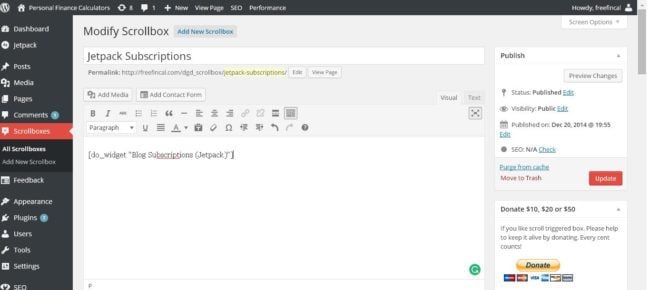
Update: You can simply enter something like
jetpack_subscription_form title=”” subscribe_text=”” subscribe_button=”Subscribe!” show_subscribers_total=”0″
within [] and publish. You can also write additional text like this

5) You can see the plugin settings at the bottom of this page. Change settings as desired.
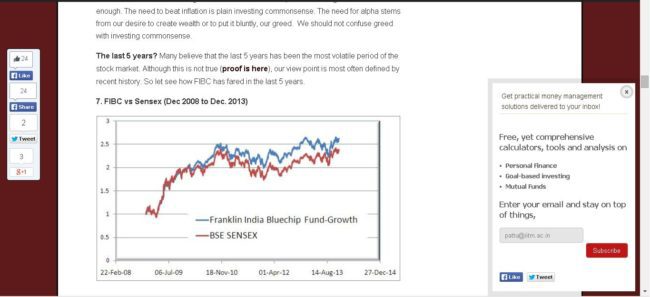
Done! The Jetpack Blog subscriptions Widget should now be visible (and usable!) within the pop-up window. Here is a screenshot.
If you know better ways of accomplishing the same, do let me know.