Last Updated on August 30, 2021 at 3:44 pm
XLMFTrackerAG, an Excel based mutual fund portfolio tracker, is another excellent offering by Satish Mistry, financial planner at MoneyCare Financial Planning. Satish recently developed a comprehensive financial planning tool.
XLMFTrackerAG is suitable for individual investors, financial planners and independent financial advisors to manage a mutual fund portfolio. Financial planners can easily process the portfolios of clients who invest in ‘direct’ mutual funds! So no more excuses on that front!
You can use XLMFTrackerAG to track all kinds of mutual fund transactions – lump sum, SIP, STP, SWP etc. The entries automatically get arrange according to as per asset class and AMC. You can then analyze the returns, capital gains and much more. Check out the features below and download a trial version!
Here is a screenshot of the home page of XLMFTrackerAG
🔥Secure your future with our Robo-advisory tool trusted by over 3,500 investors and advisors. From effortless retirement planning to funding your children’s biggest dreams, turn your financial goals into reality. 🔥
Subscribe for money management solutions via email! (Link takes you to our email sign-up form) Join 32,000+ readers in our community.
👉 New Tool Alert! NaviPlan: A Privacy-Focused Multi-asset Tracker and Goal Planner 👈
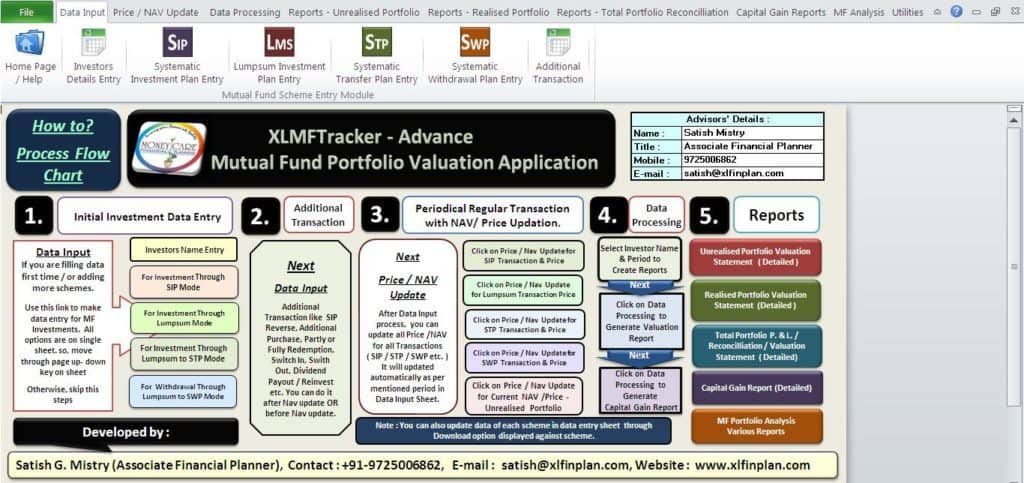
Pictorial description of features (courtesy Satish)
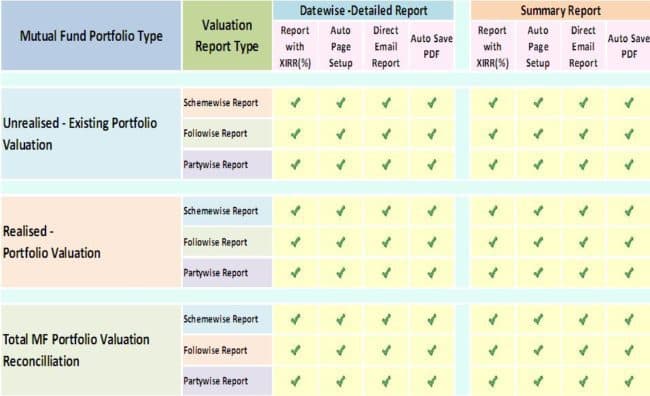
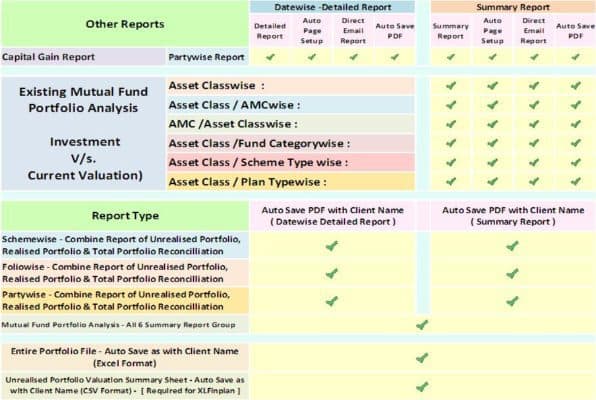
Detailed listing of features as provided by Satish:
System Requirements : Excel 2010 (macros enabled) with internet connection.
Features relevant to Entry Module:
- It has basic 5 entry modules, investor/client’s details, address & Email address, Investment data entry module for SIP Investments, Lump sum Investments and Lump sum Investment with STP & Lump sum to SWP Transactions. There is one another entry module for additional transactions.
- For Systematic Investment Plan (SIP): You just have to mention Investment start date, specific one date for future transaction & SIP Amount. The default frequency for transaction is “Monthly”. If you have run SIP for specific period & stopped, you can mention stop date also.
- For Lump sum Investments: You just have to mention Investment start date & Lump sum Investment Amount.
- For Systematic Transfer Plan (STP) from Lump sum Investments: You just have to mention Investment date, STP start date & STP Amount. Frequency of transactions options is Quarterly, Monthly & Weekly. If you have run STP for a specific period & stopped, you can mention stop date also.
- For Systematic Withdrawal Plan (SWP) from Lump sum Investments: You just have to mention Investment date, SWP start date & SWP Amount. Frequency of transactions options is Quarterly, Monthly & Weekly. If you have run SWP for a specific period & stopped, you can mention stop date also.
- Other common details are Investor (1st Holder) Name (which you can select from dropdown list), Investment Folio No., Select AMC Name from dropdown list & click on button in same cell to search scheme of such AMC. You will be provided a list of scheme through dropdown option in scheme name field.
- As this application is depend on pricing data from www.amfiindia.com, you can get all valuation information automatically for each transactions in this application basis on investment period mentioned against each schemes. In the same way, you have another entry module for additional transactions. It is
- SIP Reverse (If you have skip/rejected your SIP Transaction)
- Additional Purchase
- Partly or Fully Redemption details.
- Switch in & Switch Out details.
- Dividend Pay-out & Reinvestment details.
- Next process is NAV / Price updation of all schemes in portfolio. You have 2 way options to update NAV /Price.
- You can update each scheme NAV separately (In entry module part against each scheme )
- OR from Main Menu you can update all Historical NAV / Price for SIP / Lump sum/ STP / SWP Transactions as well as Additional Transactions. For Current Valuation of Unrealised Portfolio, you can update Current NAV also.
- Last Process is to Generate Valuation & Capital Gain Reports. After updating each Transactions / OR / NAV Price Update, you must follow this process to update all reports. It is available in Data Processing Menu.
- This application does not consider any entry /exit load charges or STT Charges. Calculation of entire reports based on NAV from AMFI. Completely offline application to protect the privacy of Investors.
Download Trial copy of this application from: http://goo.gl/fUclWU
For more information, please contact Satish.
Email: satish@xlfinplan.com
Facebook – http://facebook.com/satishmistry27
Linkedin – http://in.linkedin.com/pub/satish-mistry/13/536/929