Income tax filing might look like a tedious process. However, it brings a smile to your face when you see there is a refund due from the income tax department. So, after you file ITR, the wait starts, especially if the refund amount is a little more significant. In this article, we will learn how to check the income tax refund status.
About the author: Salma Sony is a SEBI Registered Investment Adviser and a Certified Financial Planner with 13 years of experience in the financial industry. She is an M.B.A. Finance graduate and has guided 300+ families in comprehensive financial planning with a vision to advise families to achieve financial wellness and peace of mind. She can be contacted via her website: salmasony.com. This is an archive of investment planning articles by Salma.
Reason of Income Tax Refund
When you file an ITR, you can have three outcomes, and a refund is one among them. Let’s understand them better so you don’t miss out on any opportunity to claim a refund.
ITR Filing outcome-1: No Refund or Payable
In most cases, when you declare all your income well to your employer, you may experience the first outcome: no tax payable or refund; this happens only when you mindfully submit all the proofs.
🔥Secure your future with our Robo-advisory tool trusted by over 3,500 investors and advisors. From effortless retirement planning to funding your children’s biggest dreams, turn your financial goals into reality. 🔥
Subscribe for money management solutions via email! (Link takes you to our email sign-up form) Join 32,000+ readers in our community.
👉 New Tool Alert! NaviPlan: A Privacy-Focused Multi-asset Tracker and Goal Planner 👈
To claim:
- HRA – Rent Receipt
- LTA – Travel proof
- 80C– Investment proof
- 80D – Medical premium proof
- 80G – Donation proof
Also see: Tax Planning For Salaried Employees
If you have changed company, inform your employer to take the necessary information to avoid duplicating information for tax calculation liability.
ITR Filing outcome-2: Tax Payable
The second outcome, which is tax payable, is due to the non-declaration of certain income like rental income, capital gain due to the sale of financial assets, and advance tax is due, or if you have changed your job, both the employer has considered the basic and Chapter V deduction (duplicate).
ITR Filing outcome-3: Tax Refund
The third outcome is when your employer has deducted additional tax. That could be because you might have missed providing all the investment proofs, and while filing, the same has been declared.
Steps to Check Income Tax Refund Status Online
If you are expecting a tax refund, here are the steps to check the status.
Firstly, you need to log in to the ITR e-filing website.
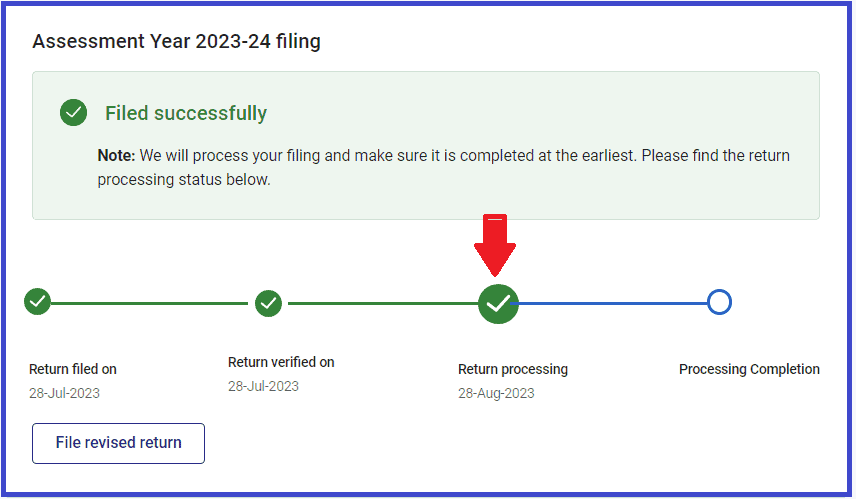
Scenario-1: Status- Return processing
In this case, you must wait and give the Income tax department some time.
Scenario-2: Processing completed (Refund initiated)
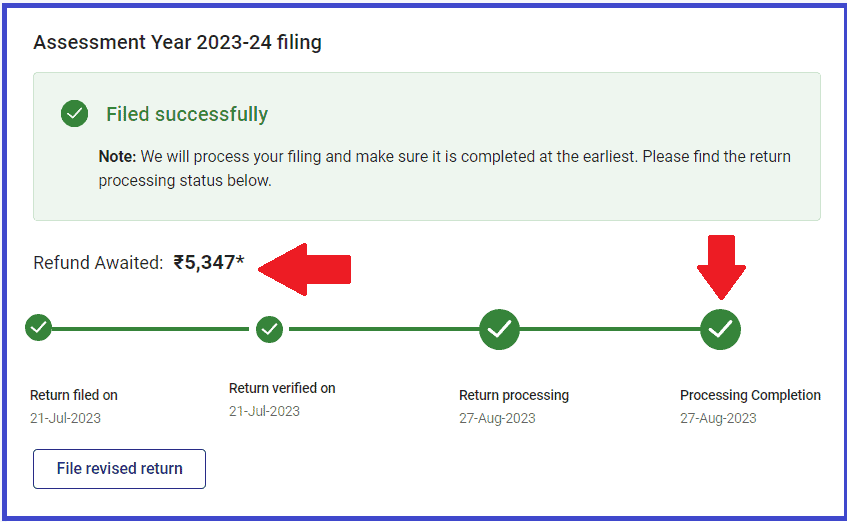
On the home page, you will find the status and refund awaited.
The payer often isn’t aware that the tax refund has been credited. You can follow the below steps to find your tax refund status and the exact amount and date of credit. In case of credit, check your bank account to confirm.
Step 1: Check the tax refund status. In this example, the ITR processing is completed.
Step 2: Cross-check the refund-initiated date and amount
On the home page, go to Services -> View Filed Return -> Click, and the following screen appears (Shown in the below screenshot)

Now Click “View Details”, and the following screen appears.
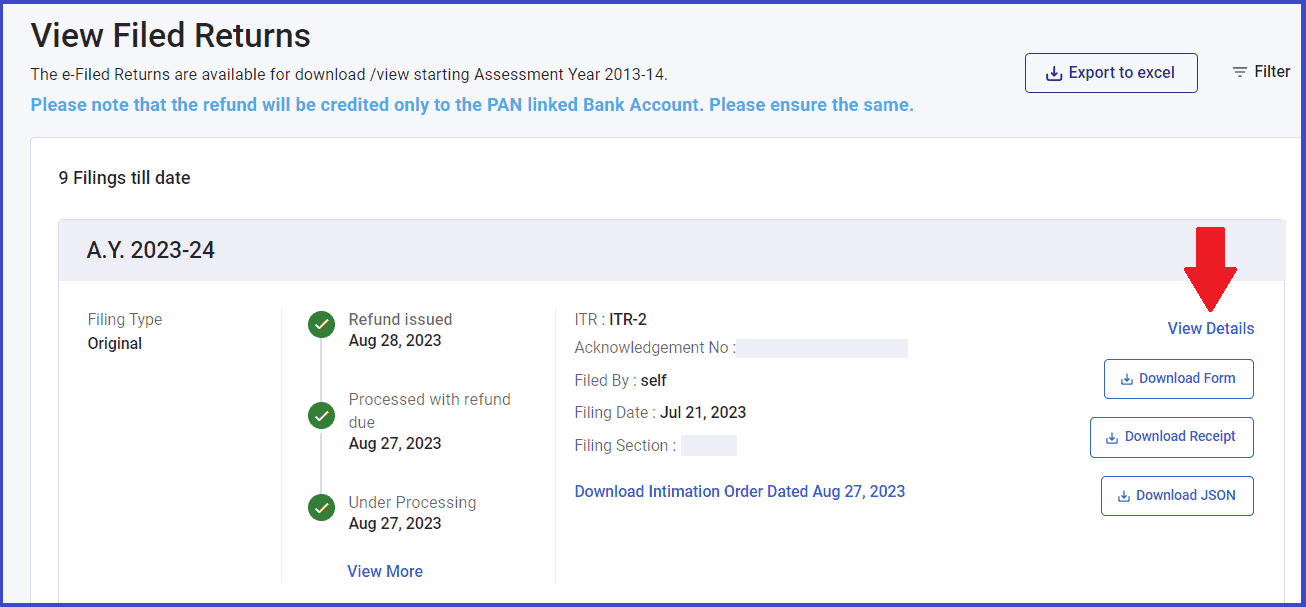

Here, the refund date is 28th August, and the amount is Rs. 5,480. Please check your bank account on the same date. The amount must have been credited.
Have you noticed the refund amount is a little more than you claimed? In this case, an additional Rs. 130 (5,480-5,347). That’s interest earned on the refund amount.
Scenario-3: Processing completed (Refund Due)
You may also find a situation where ITR has been processed with a refund, but the refund has not yet been received, as in the below case.
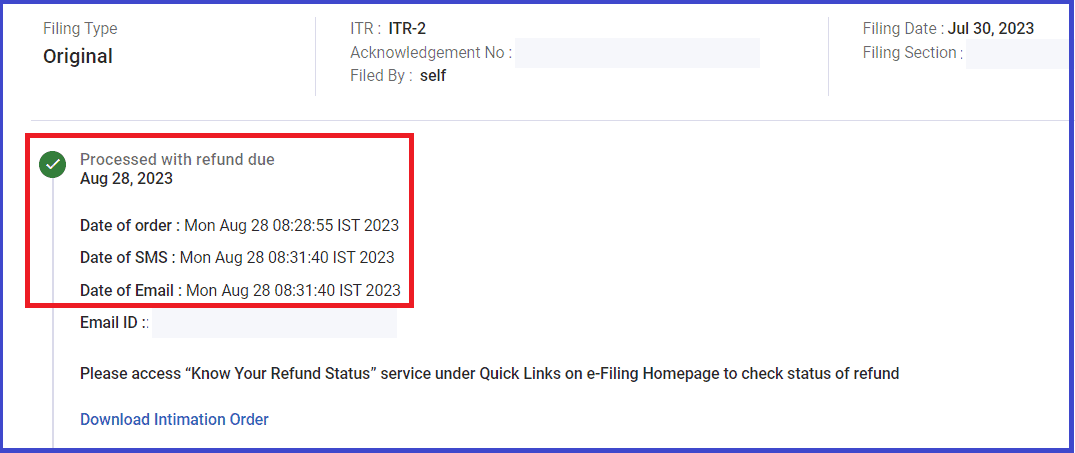
In such a case, please check your refund status by visiting Know Your Refund Status under the quick link on the e-filing home page and act according to the instructions.

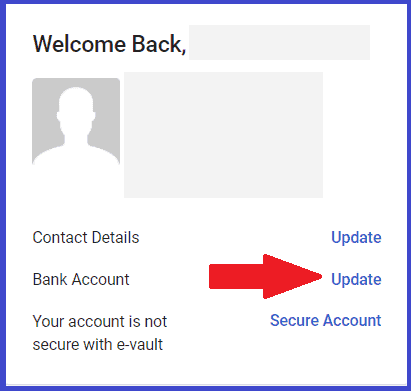
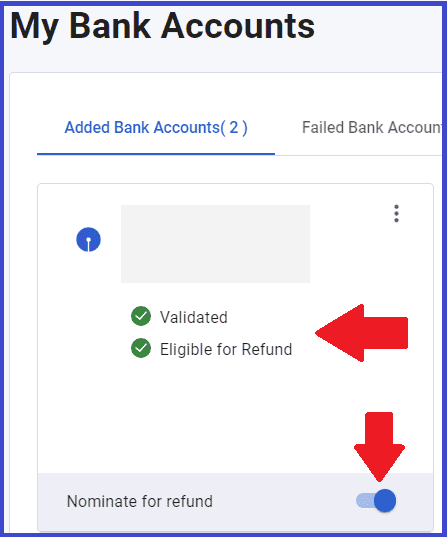
You may also cross-check before contacting the bank if your bank account is validated, eligible, and nominated for a refund.
You can check by logging in to the e-fling portal, going to the home page, and clicking update.
In case of a discrepancy, update the correct details and ensure your bank account is validated, eligible, and nominated for refund.
With this, I am sure you will get your refund soon. Make sure you utilize the refund amount well by investing or pre-paying your loans.