Last Updated on June 19, 2022 at 8:46 am
In this step-by-step guide, we shall discuss how to enter capital gains from mutual funds or shares in ITR2 or ITR3. Salaried taxpayers must use ITR2 if they have any capital gains to declare. Businessmen and professionals must ITR3 for the same purpose. The capital gains schedule and filing procedures are identical in ITR2 and ITR3.
Data or information required: You will need to get the capital gains statement of mutual funds from CAMS and Kfintech (erstwhile Karvy). For shares get them from your demand provider.
There are some nuances in using the data. In this article, we shall consider simple situations and discuss complex cases in another article. See: How to use MF capital gains statement for STCG & LTCG entries in ITR2 (or ITR3).
First, select the necessary schedules. This process is slightly different in ITR3 but is easy enough to spot. You will need to select the schedules CG and 112A
🔥Secure your future with our Robo-advisory tool trusted by over 3,500 investors and advisors. From effortless retirement planning to funding your children’s biggest dreams, turn your financial goals into reality. 🔥
Subscribe for money management solutions via email! (Link takes you to our email sign-up form) Join 32,000+ readers in our community.
👉 New Tool Alert! NaviPlan: A Privacy-Focused Multi-asset Tracker and Goal Planner 👈
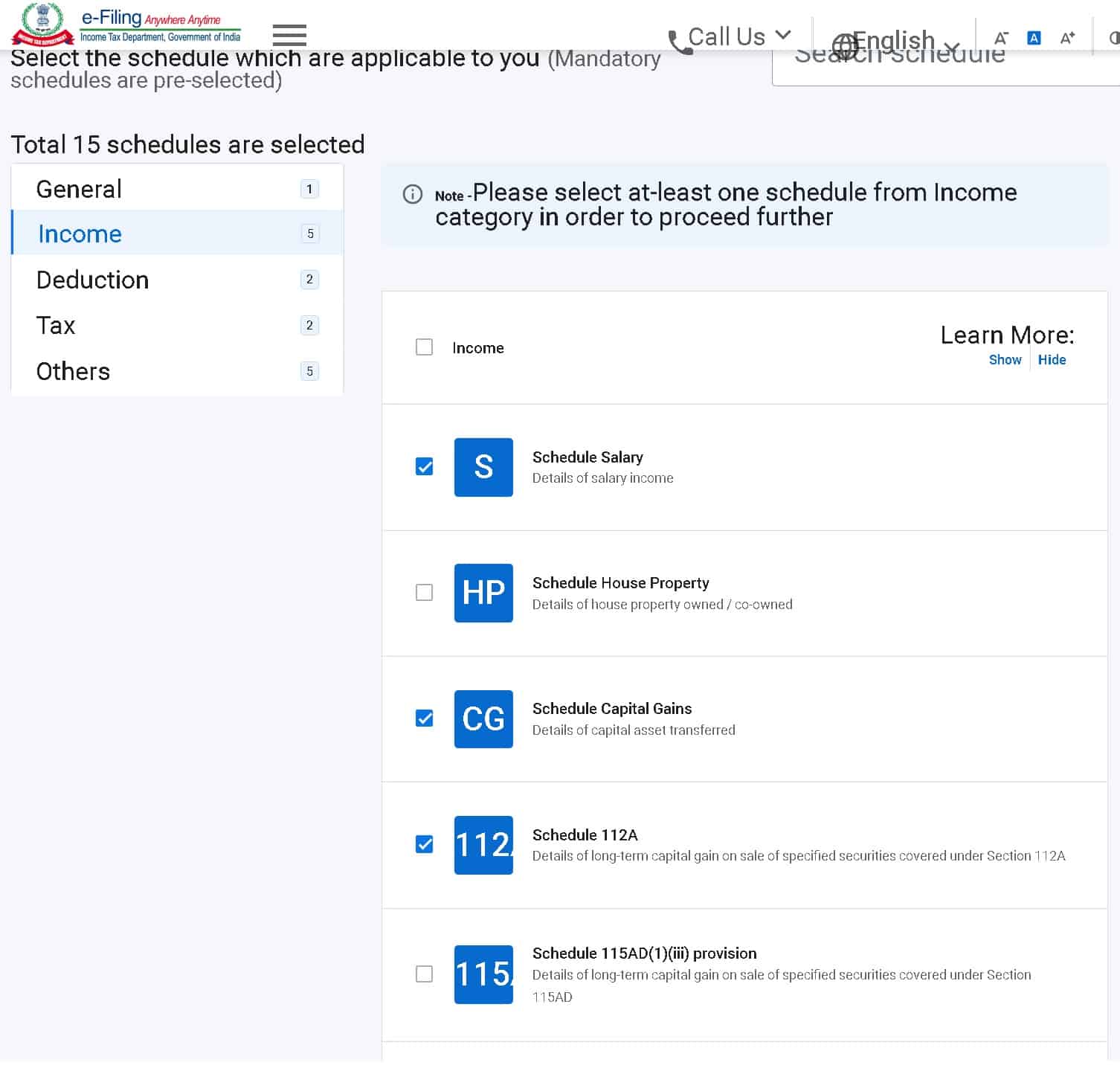
The “others” tab has schedules related to CG loss from past years to be brought forward or current year loss to be carried forward. We will not get into this in this article. They would anyway be auto-selected.
When you click on schedule CG, you will get this checklist.
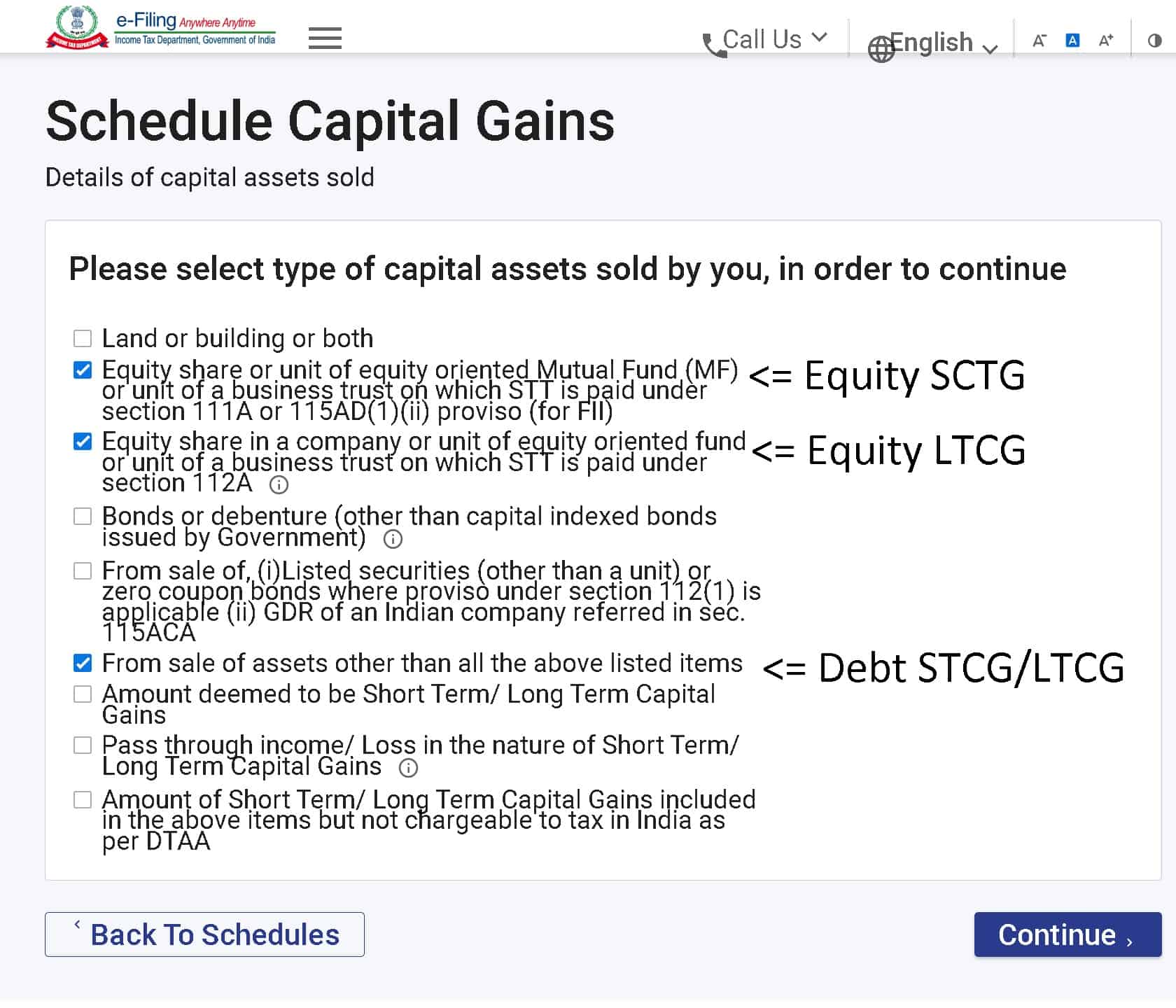
If you have short-term capital gains from shares and equity mfs, select “Equity share or unit of equity oriented Mutual Fund (MF) or unit of a business trust on which STT is paid under section 111A or 115AD(1)(ii) proviso (for FII)”.
If you have long-term capital gains from shares and equity mfs, select “Equity share in a company or unit of equity oriented fund or unit of a business trust on which STT is paid under section 112A”.
If you have short or long-term capital gains from non-equity mutual funds (debt funds, FOFs, international funds, gold funds) select “From the sale of assets other than all the above-listed items”. Hit continue.
This is how the CG schedule will look before it is filled. The blocks annotated in red need to be filled.
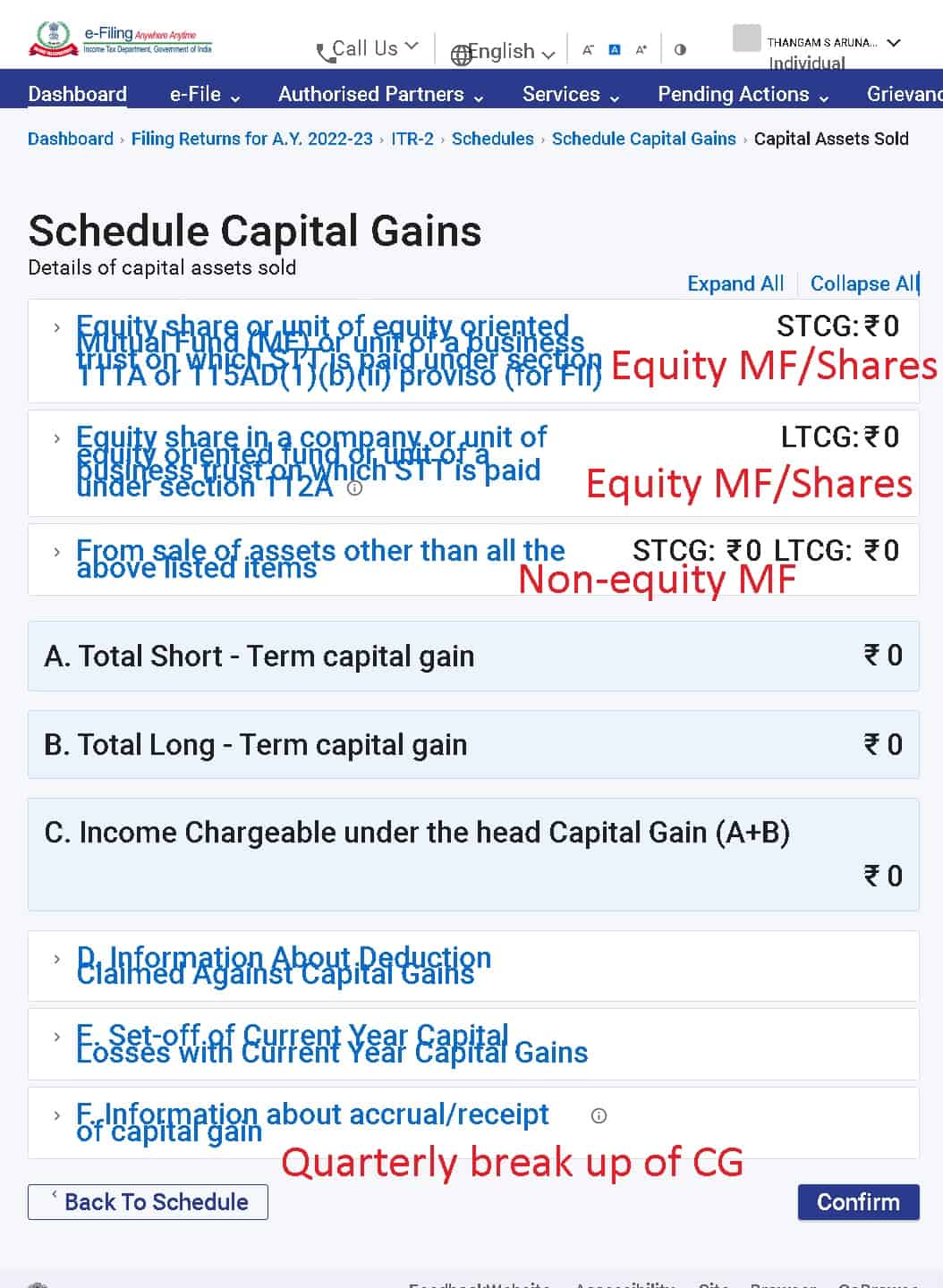
Entering STCG from Equity MF/Shares
(1) Let us start with Equity MF/Share STCG. Select section 111A to proceed.
- Full value of consideration = Redeemed Amount
- Cost of acquisition = Purchase price
- Indexation = Increasing the purchase price using the cost inflation index. This is applicable only for Non-equity LTCG. Hence “Cost of acquisition without indexation” here.
- Expenditure incurred wholly and exclusively in connection with transfer (brokerage)
- The above meanings are universal and will be used for types of capital gains.
A simple example is shown below. You will need to get these numbers from the capital gains statement. We will look at a complex example in the next article.
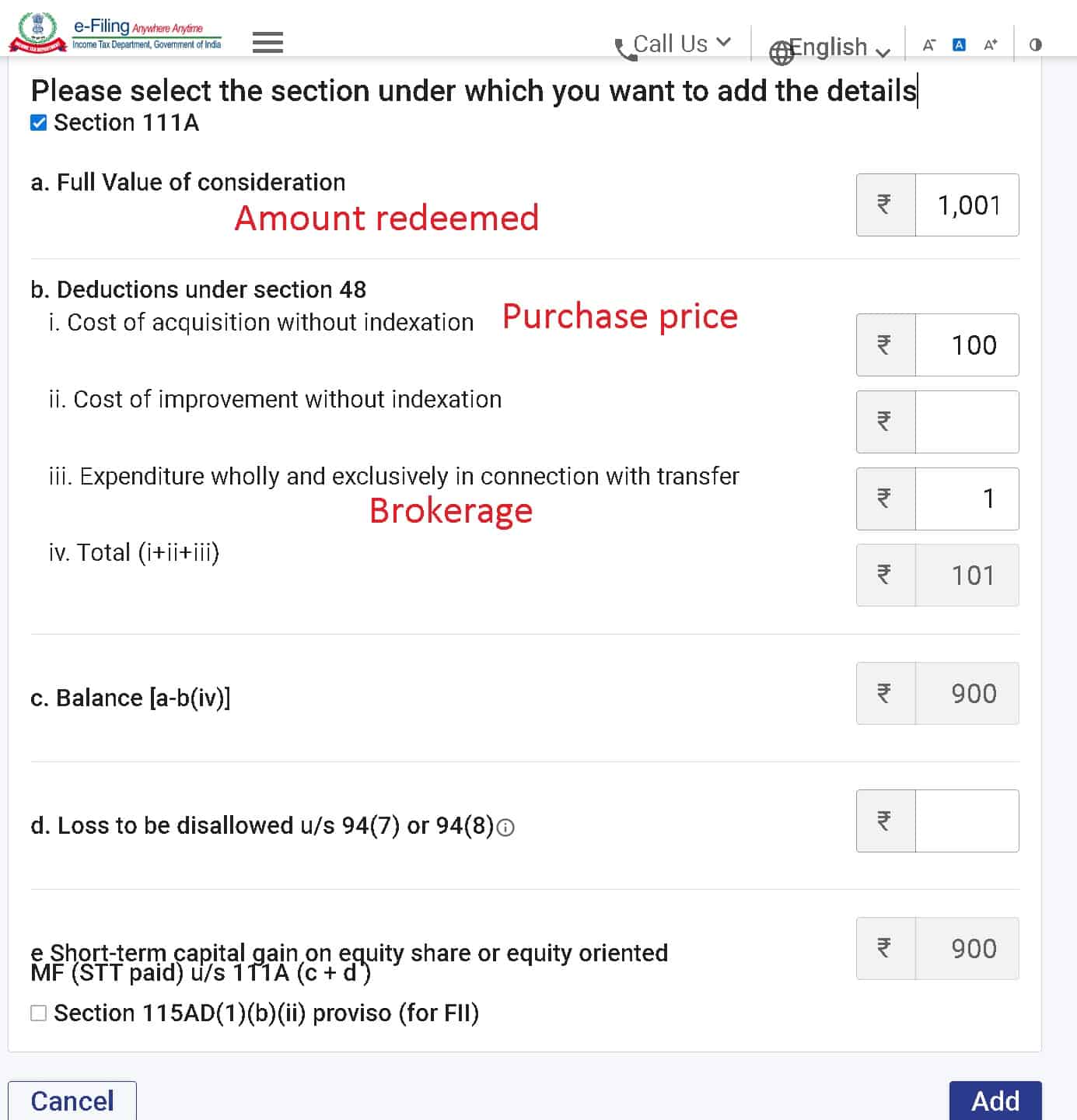
You will need to repeat this process for each STCG entry.
Entering STCG and LTCG from Non-Equity MF/Shares
(2) Next we will consider STCG or LTCG from non-equity MFs as that is simpler to handle.
(a) STCG from non-equity MFs
The meanings of the entries are as above. The full value of consideration should be entered in the place marked by the red arrow.
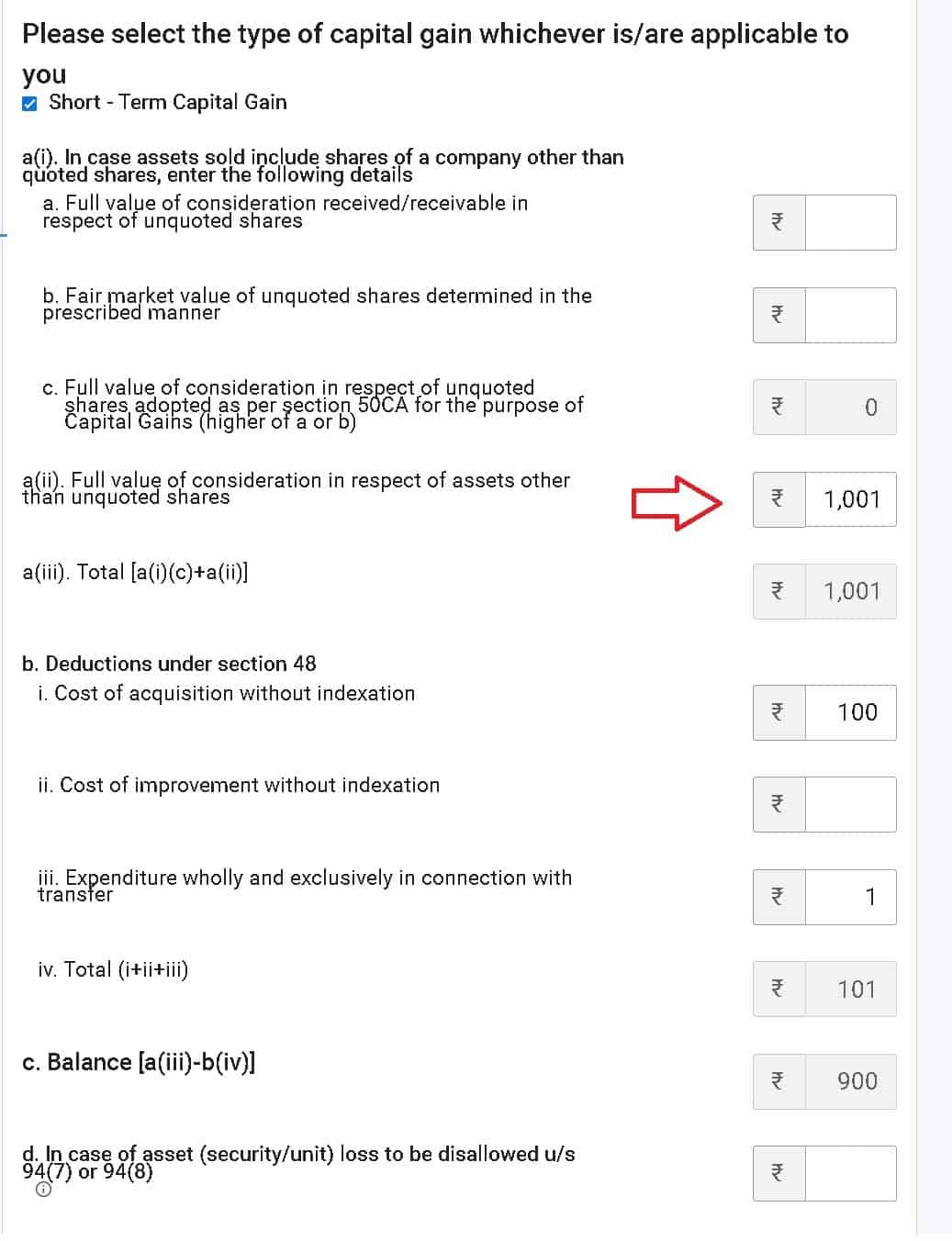
(b) LTCG from non-equity MFs
In this case, the purchase price with indexation should be entered and not the bare purchase price. This information will be available in the capital gains statement.
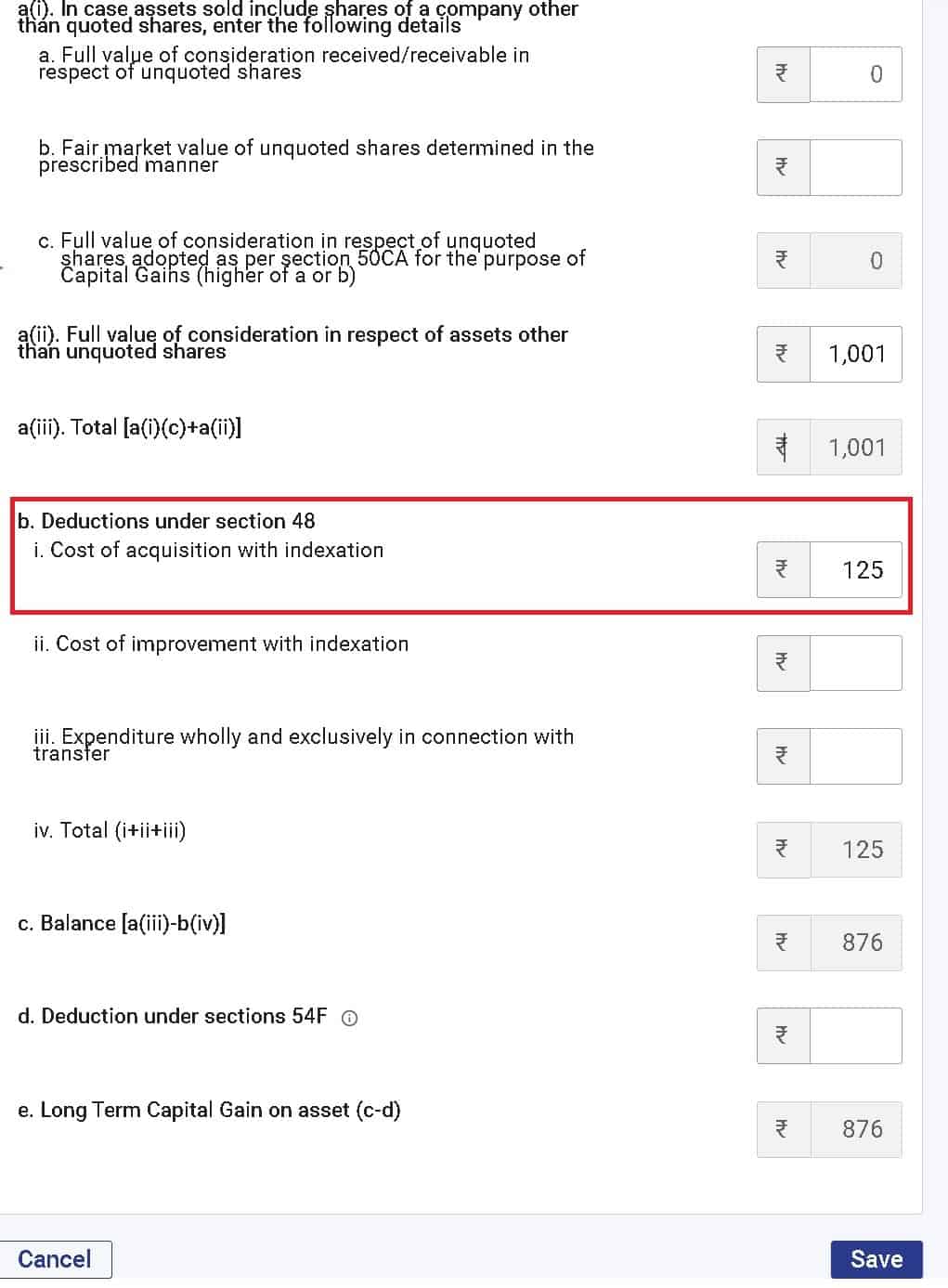
Entering LTCG from Equity MF/Shares
(3) Finally, we shall look at LTCG from equity MFs and shares. The first step is to select schedule 112A as indicated below.
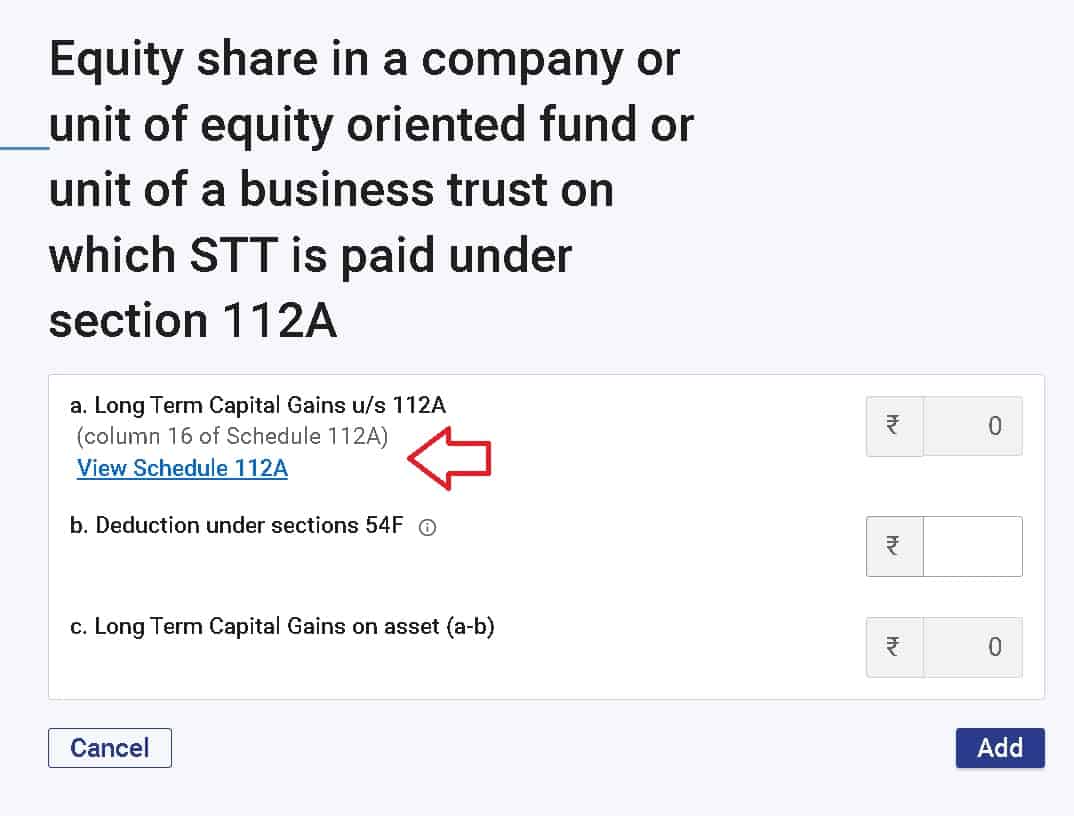
In schedule 112A, there is an option to enter all data in a CSV file and upload it. Inviting as it may seem (if we have a large number of entries), this can be a pain with many validation errors. It is better to enter data manually as indicated below.
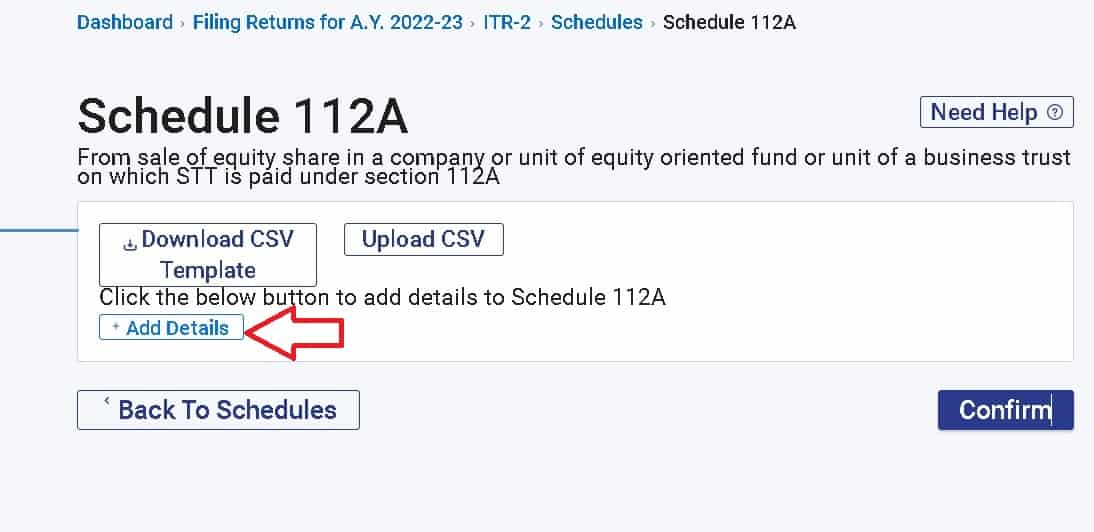
This is where we need to carefully study the capital gains statement.
Suppose we have been running a SIP in a mutual fund for seven years and stopped the SIP in Aug 2021. Then in Oct 2021, we redeemed all the units from the fund to reduce clutter in the portfolio; get rid of an underperformed and also rebalance the portfolio.
- Some units were purchased less than a year ago. The gain from these should be filed under equity STCG in the section mentioned above.
- Some units were purchased after 31st Jan 2018. The LTCG filing for these is simple as there is no grandfathering involved. That is the LTCG is taxable directly. See: Equity LTCG Tax With Grandfathering Explained: Video + Calculator.
- Some units were purchased before 31st Jan 2018. So the gain from these units up to 31st Jan 2018 is tax-free. Only the gain obtained thereafter is taxable. So the way we report (2) and (3) are different!
Notice that from a single redemption we have three types of tax reporting: STCG; LTCG without grandfathering and LTCG with grandfathering. All relevant information will be available in the capital gains statement. However, it will not be available in the format required by the tax man! So some dissection is necessary. We will deal with an example in the next article. Here will mention the entries to be made.
Mutual funds and stocks are redeemed on a first-in, first-out basis. Suppose our monthly SIP is Rs. 1000 resulting in the purchase of about 100 units each month and we redeem 10,000 units after a few years, the units purchased first will be redeemed first. This means there will be multiple dates of purchase for a single redemption. The first 100 units were purchased on X date, and the next 100 units on Y date until the 10,000 units are filled.
ITR2/ITR3 Reporting of LTCG on units purchased on or before 31st Jan 2018
- You need the ISIN code of the mutual fund or stock. When this is entered, the name will be auto-populated.
- No of shares or MF units sold: In the case of MFs, this may not be readily available. So you will have to dig into the transaction list to find the exact number of stocks or units redeemed.
- Sale Price: Price or NAV on the date of redemption.
- Cost of acquisition: This is the total purchase price of all redeemed units. In the above example, (100 units times Nav on X date) + (100 units times NAV on Y date) + …. This may be available in the CG report or we will have to figure this out from the table of transactions. It is not hard to do but something that may need to be done.
- Fair Market Value per share/unit as of on31st January 2018: The NAV or market price for grandfathering. Will be available in the CG report. Not this is the price per unit or share.
- Expenditure wholly and exclusively in connection with transfer: Any brokerage involved.
- Full cost of consideration: Will be auto-populated based on “No of shares or MF units sold” and “Sale Price”.
- These inputs have to be given for each stock or mutual fund.
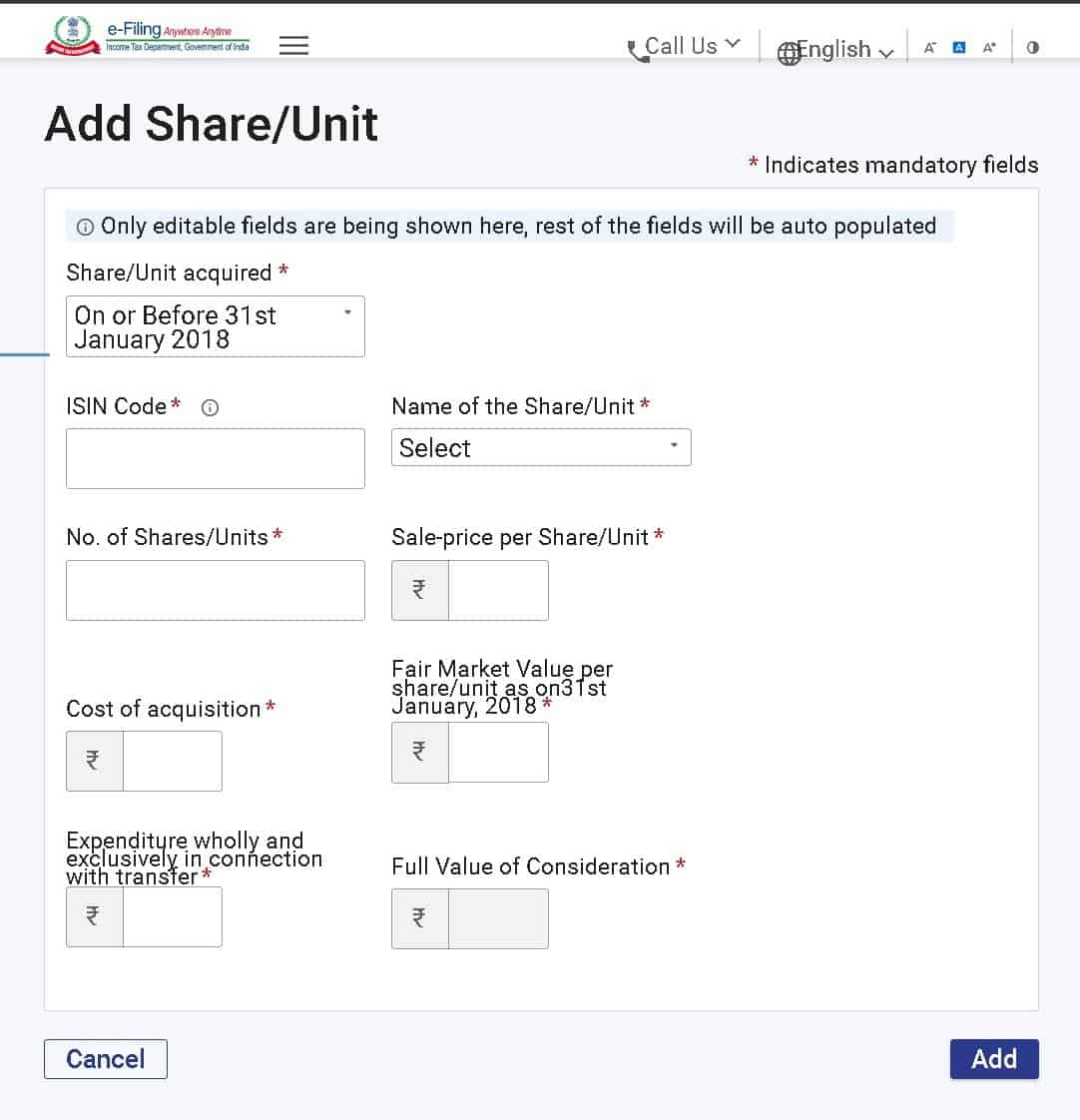
ITR2/ITR3 Reporting of LTCG on units purchased after 31st Jan 2018
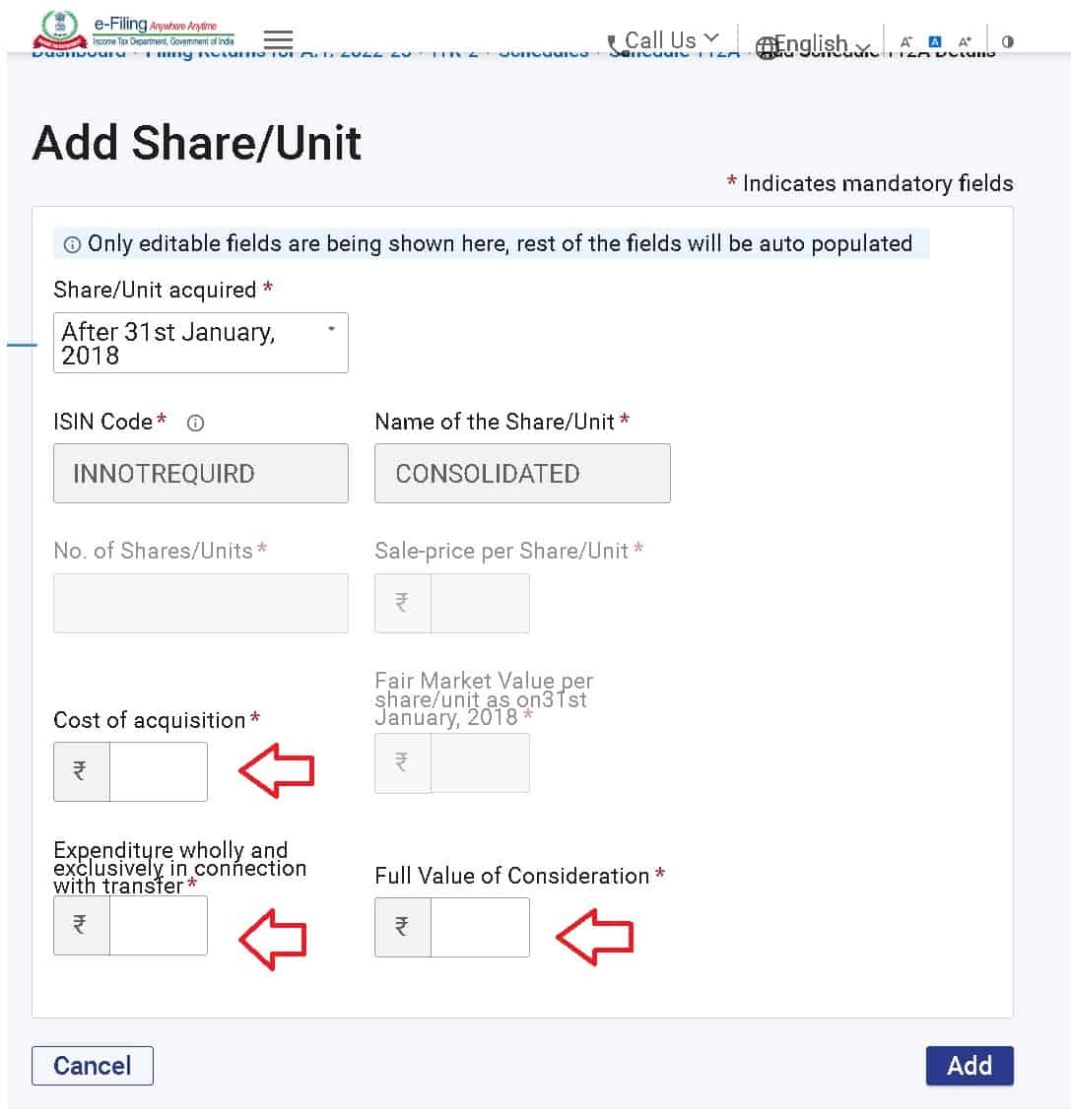
Thankfully, this is a lot simpler. Only the three familiar inputs marked below need to be filled.
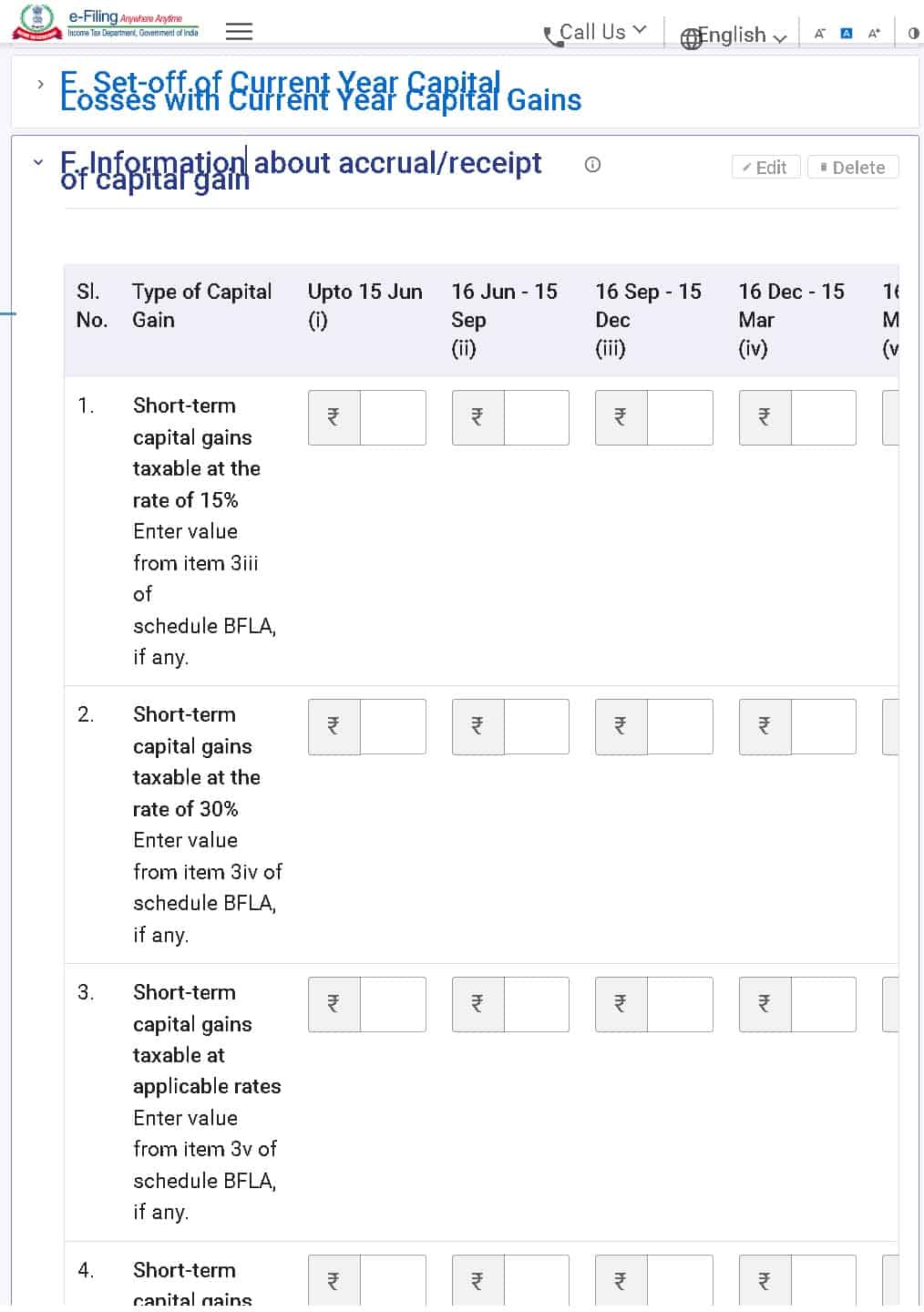
The quarterly breakup of STCG and LTCG In ITR2 and ITR3
Next, we need to navigate to item F of schedule CG and enter the quarterly break up of STCG, LTCG without indexing (equity shares, equity MF) and LTCG with indexing (non-equity MFs) or any other CG reported.
These “quarters” are defined with respect to advance tax payment deadlines.
- April 1st to June 15th
- June 16th to Sep 15th
- Sep 1t6th to Dec 15th
- Dec 16th to Mar 15th
- Mar 16th to Mar 31st
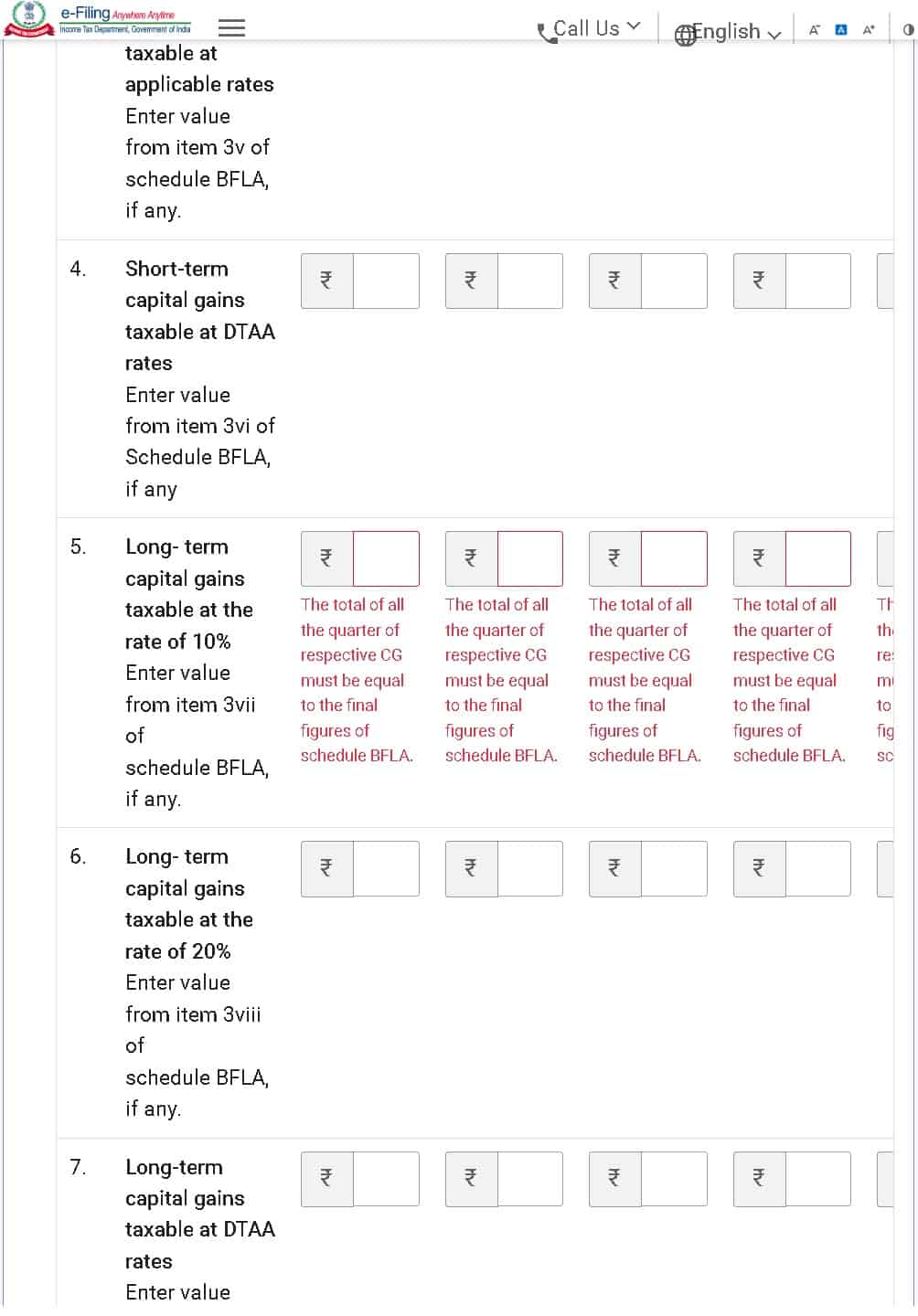
I usually forget to report this breakup. Upon validation, there will be errors thrown up. If we click on these errors, it will tell us what to do. See, for example, the screenshot below.
In summary, capital gains reporting in ITR2 or ITR3 can be a bit cumbersome but thankfully the income tax website is now robust and with some patience, we can get it done. In the next article, we shall cover how to find the necessary information in a capital gains report. See: How to use MF capital gains statement for STCG & LTCG entries in ITR2 (or ITR3)