Last Updated on April 26, 2026 at 3:37 pm
We are happy to announce a new Google Sheet-based mutual fund and stock investment tracker. The sheet’s features are presented below.
Key features of the freefincal mutual fund and stock tracker:
Last updated with minor improvements: 20th Jan 2026.
Update Feb 2024: A Sov Gold Bond Tracker on Google Sheets is free for those who purchase it!
Update April 2024: A NPS Portfolio Tracker on Google Sheets is free for those purchasing the tracker!
- A private, all-in-one-place tracker that is independent of our computers.
- Fast and functionally superior to our previous Excel-based trackers.
- It is completely open-source with no hidden formulae. It can be customised at will.
- Easy to share with our life partners as part of our continuity kits. See: How to help our life partner manage money in our absence.
- It is updated to the current NAV when the sheet opens.
- New monthly* SIP transactions will be automatically available (see screenshots and instructions below). If you have multiple SIPs, you can duplicate this sheet to maintain separate records. * will not work for weekly, daily, or quarterly SIPs!
- Overall portfolio annualised return (equity + debt), overall equity and debt annualised returns available.
- A basic goal-analysis sheet for ballpark estimation of financial goal progress. The current investment value is automatically updated with revised estimates.
- Quickly find the NAV for any fund since 3rd April 2005 to enter lump sum transactions.
- The sheet includes two financial goal dashboards: one for retirement and one for a child’s future. It can be duplicated or customised for other goals.
- Those with a unified portfolio (same investments for multiple goals) can use the sheet.
- Two variants are available: One for mutual funds and another for mutual funds and stocks. The previously published stock tracker is integrated with this sheet. It accurately calculates the annualised returns of individual stocks and the overall portfolio, including all corporate actions such as dividends and splits, per SEBI norms, avoiding the mistakes many stock portfolio trackers make.
- All future bug updates and version updates will be made available to users. To ensure you receive these updates, add this email address to your contact list: pattu {AT} freefincal {DOT} com.
- Affordable! The fully featured tool is only Rs. 1000. This is a one-time purchase and includes all future updates! Variants with fewer features cost even less!
- NEW! Compare your mutual fund portfolio with a benchmark since inception
- We are open to feature suggestions if they would help many users.
- 100% skin in the game: we will use this sheet to track all our mutual fund and stock investments.
- For support and feedback contact: freefincal {AT} Gmail {Dot} Com
- UPDATE: Users can utilise the free tools linked in the sheets to extract MF transactions from CAMS+KFintech Consolidated PDF statements into a CSV file. The data in the CSV file can be quickly and easily reformatted to the format needed for our tracker and copied and pasted. Note: We cannot guarantee the accuracy of these tools’ extractions. You will need to check whether all transactions are included and in the correct format.
Screenshots
(1) Retirement dashboard (click to view zoom-out images)
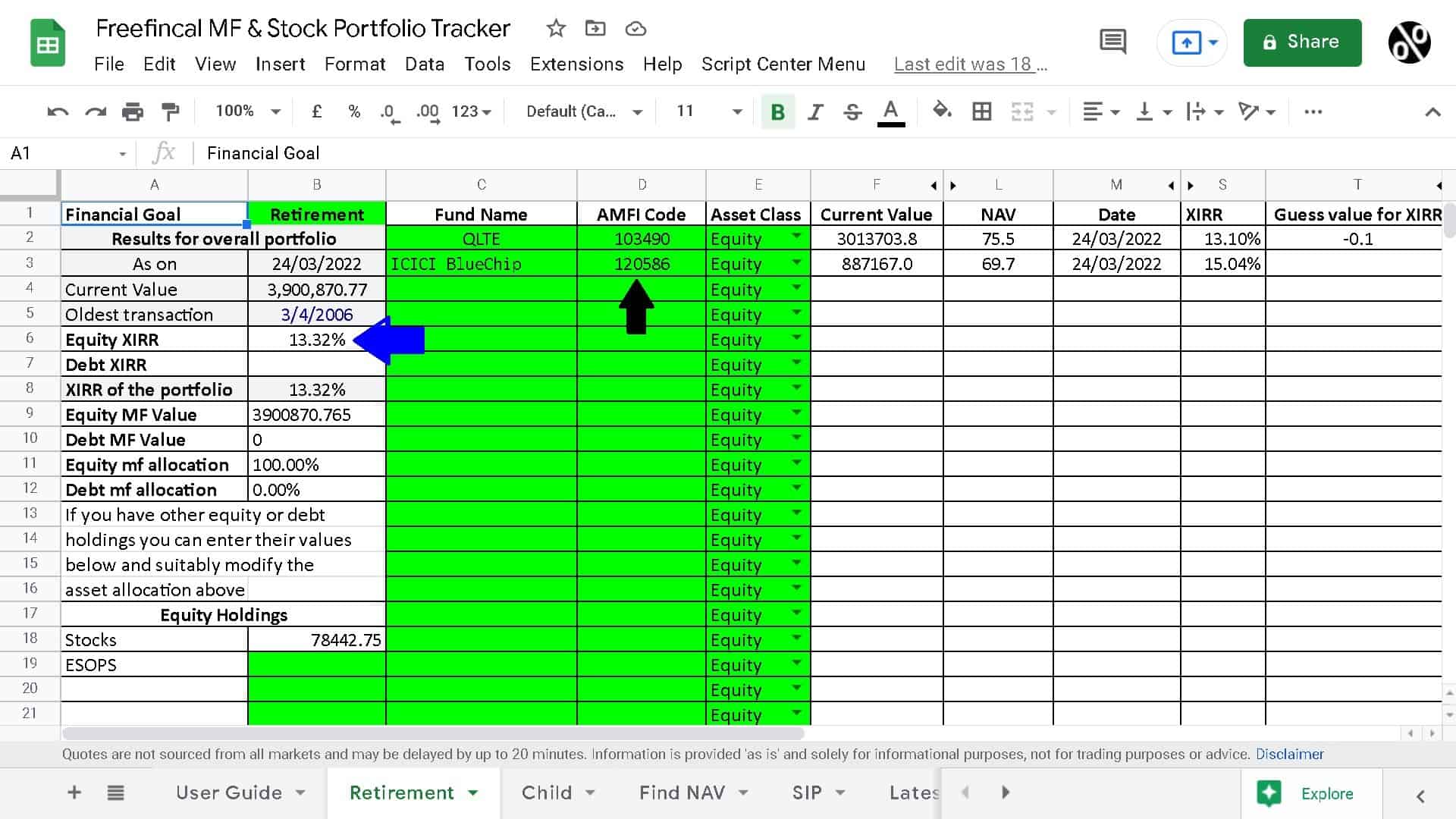
- Each investment in a fund needs to be identified by a unique nickname
- Two folios held in the same fund must be given different nicknames.
- Each fund’s AMFI Code (black arrow above) must be entered. See the video on how to do this. Instructions are also available in the sheet.
- The blue arrow shows the equity portfolio’s overall XIRR (annualised return).
Monthly SIP Transactions
The screenshot below shows the SIP transactions page. Once you enter the SIP details along with the fund nickname and AMFI code, all transitions will be auto-generated. This is for monthly SIPs only. Weekly or daily or quarterly SIPs will not work.
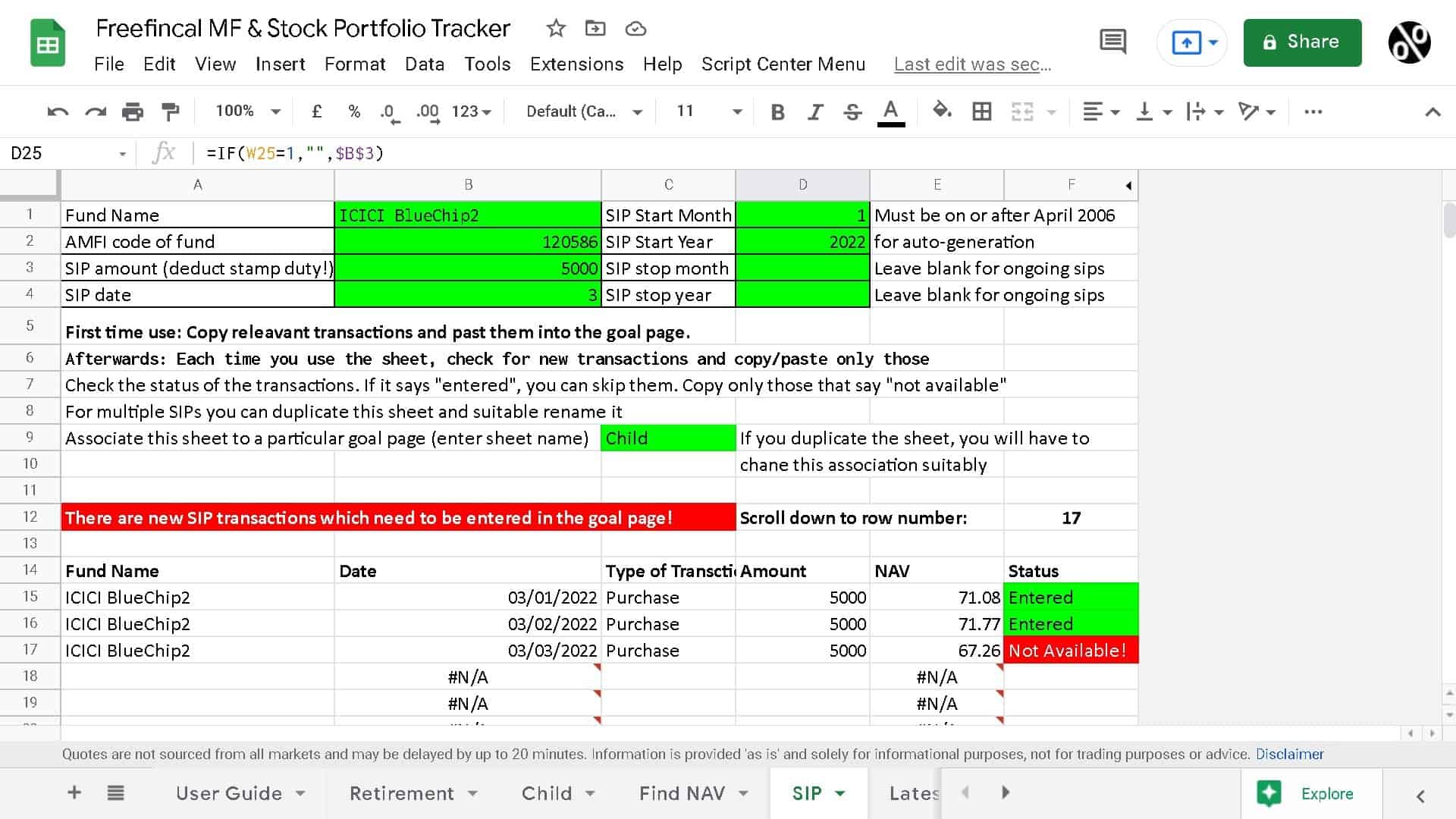
SIP Transactions page in the Freefincal MF and Stock Portfolio TrackerThese transactions should be copied to the particular goal sheet: Retirement or Child etc.
The monthly SIP transaction will be auto-updated in this sheet from the next month. There will be a message in “red” (see screenshot) in the SIP and the retirement page. Only the new transaction needs to be copied into the retirement page.
In the case of multiple SIPs, you can duplicate the SIP page to track each of them simultaneously and link each SIP with the corresponding goal.
Find NAV Sheet
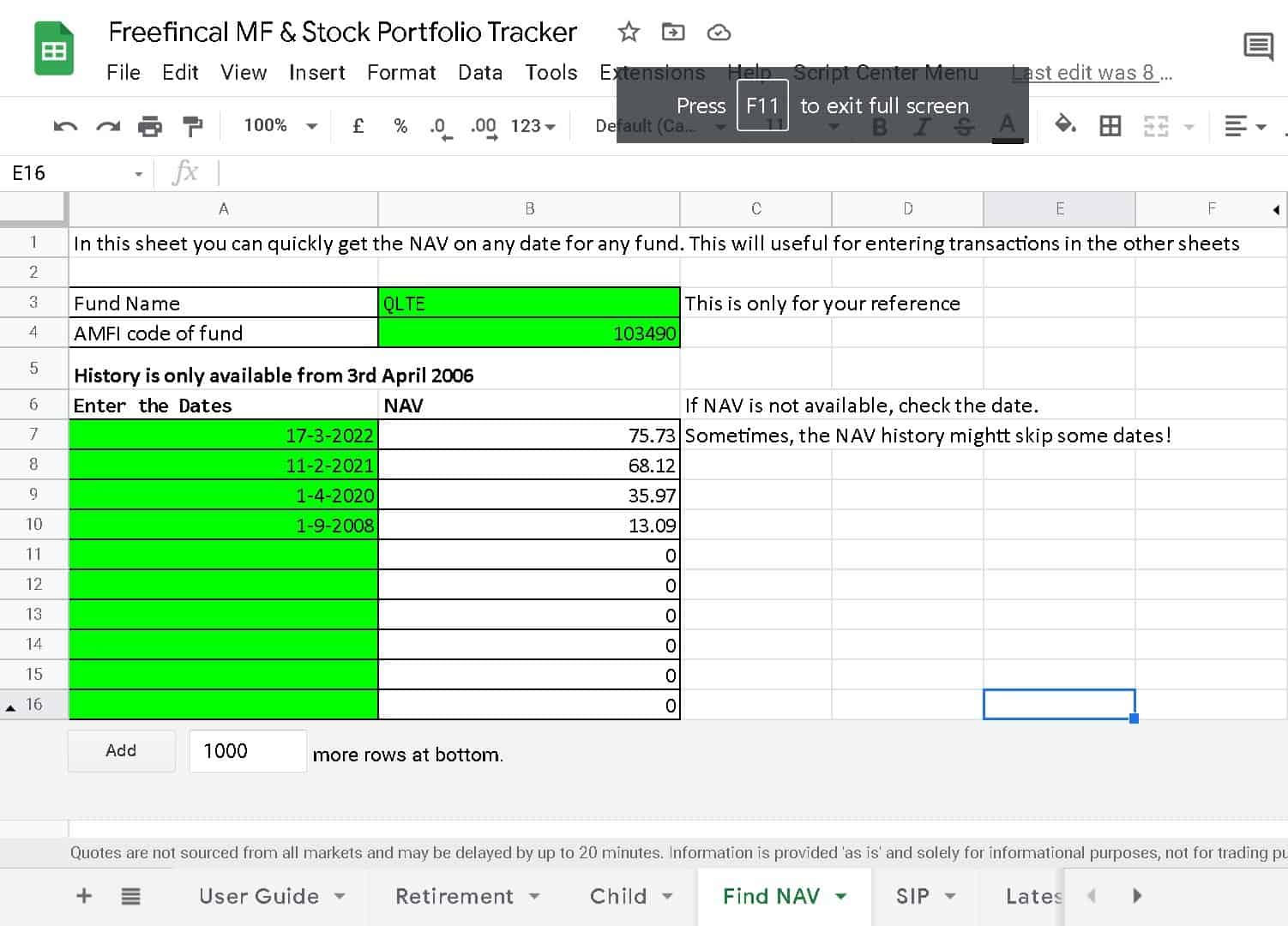
For lump sum investments or redemptions, you can use this sheet to find the NAV for any dates on or after 3rd April 2006.
Goal Analysis Sheet
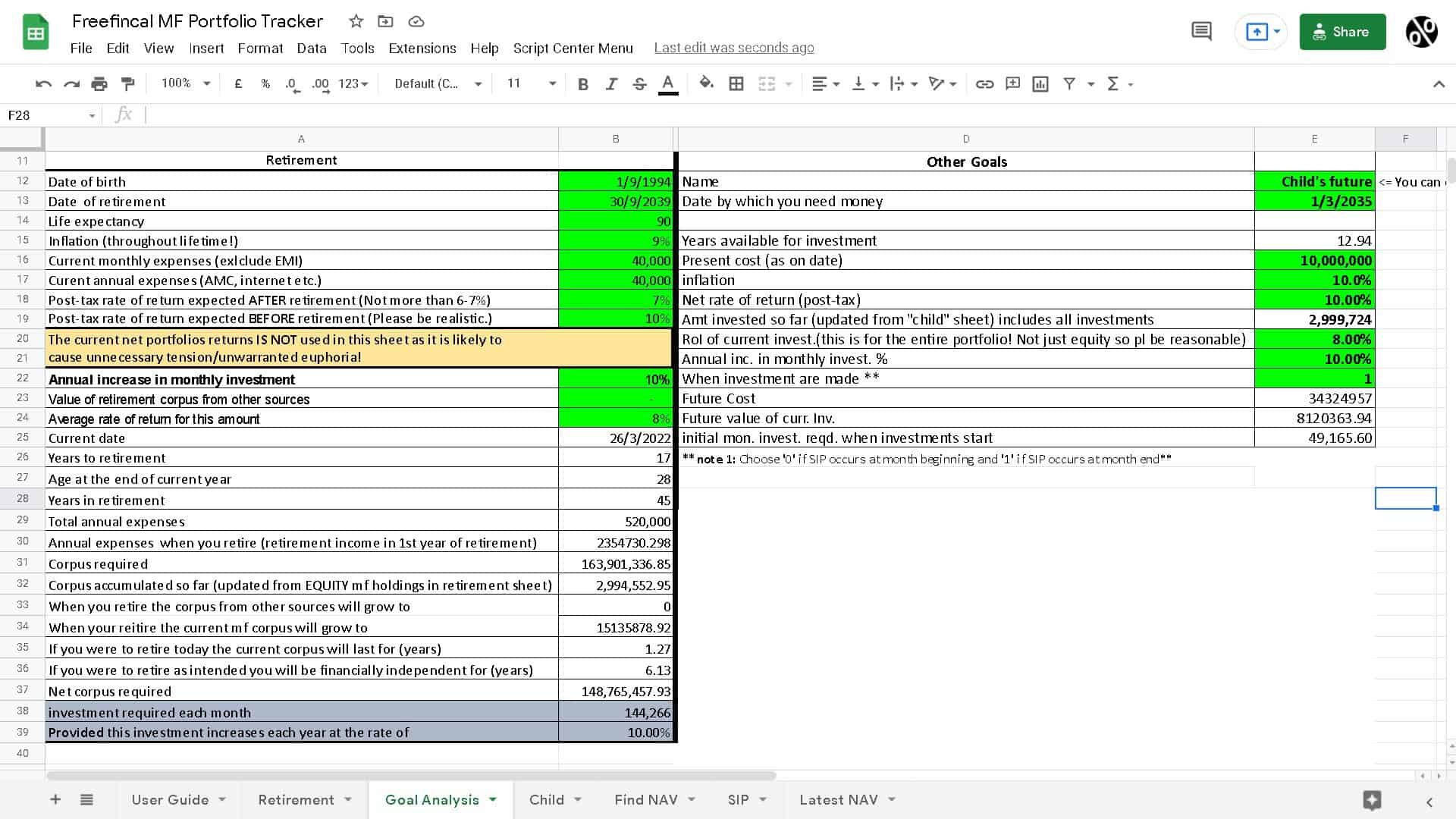
A basic goal progress analysis sheet is included. It has plenty of simplistic assumptions, and the results should only be treated as a ballpark estimate. We recommend using our robo advisory tool for accurate analysis. See: How to use the freefincal robo advisory tool to track the progress of our financial goals.
Video guides
Mutual Fund Portfolio Tracking
How to benchmark your mutual fund portfolio
Stock Portfolio Tracking
Portfolio Visualisation
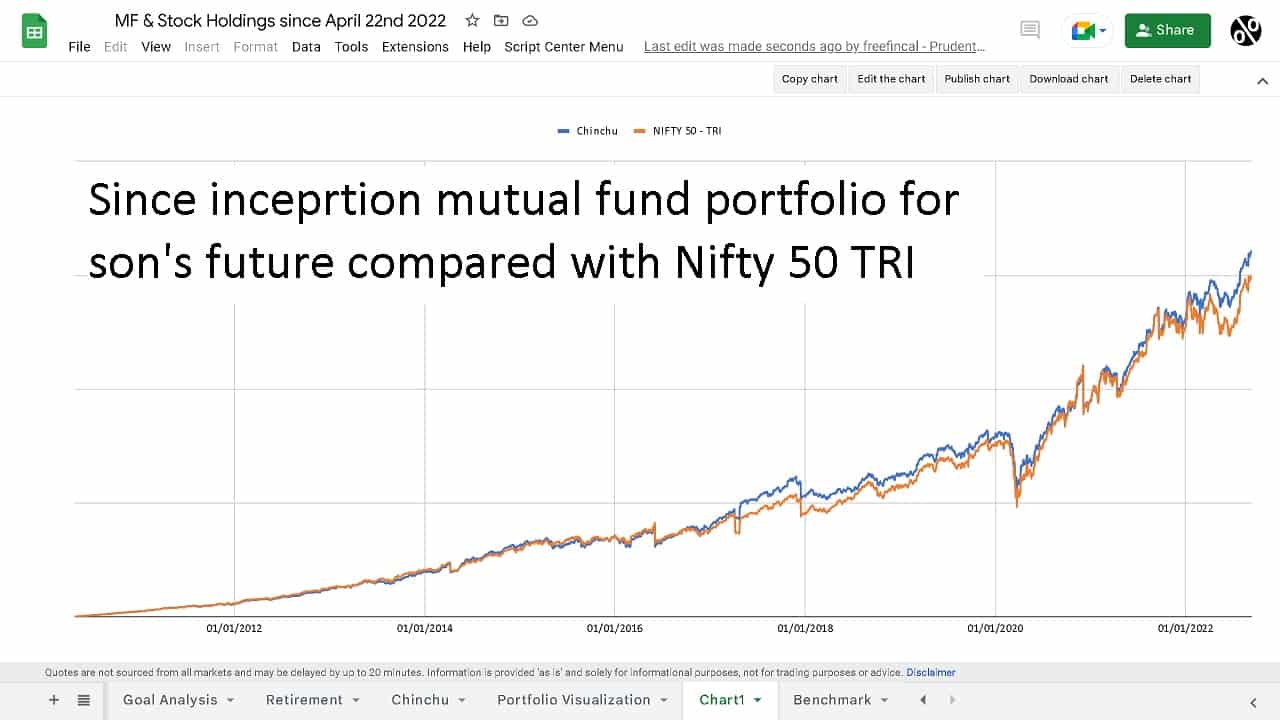
This shows the evolution of my son’s future portfolio compared with Nifty 50 TRI. For fund details, see: Lessons from investing for my son’s future for the last 12+ years
Please follow the video on how to set up the portfolio visualization module.
NOTE: You can buy sheets with this module already set up and ready for use (options A and C below). Then, You only need to see how to set up the triggers in this video.
Get the freefincal mutual fund and stock tracker!
After purchase, you will be directed to make a copy of the Google Sheet. Please make a copy and then proceed to enter transactions.
(A) Mutual Fund tracking + Stock tracking + Portfolio visualisation for mutual funds: Click to pay Rs. 1000 and get the freefincal mutual fund and stock tracker with portfolio visualization for MFs <= This is the best option.
(B) Mutual Fund tracking + Stock tracking: Click to pay Rs. 800 and get the freefincal mutual fund and stock tracker
(C) Mutual Fund tracking + Portfolio visualisation: Click to pay Rs. 700 and get the freefincal mutual fund tracker
(D) Mutual Fund tracking: Click to pay Rs. 500 and get the freefincal mutual fund tracker
(E) Already have the MF tracker or MF+ stock tracker? Get the Mutual fund portfolio visualization module (add-on for Google Sheets tracker) for Rs. 200 only (one-time purchase)