As a follow-up to our detailed guide on How to enter mutual fund and share capital gains in ITR2 (or ITR3), we now present two examples of how to use mutual fund capital gains statement for LTCG and STCG entries in ITR.
Salaried taxpayers should use ITR2 if they have capital gains to report. Businessmen and professionals should use ITRT3 for the same. We recommend that those who are filing capital gains for the first time start with the above-linked article and then head back here.
Some notes of caution:
- Capital gains statements from AMCs or CAMS or Kfintech will have different formats.
- Some statements will have a summary and some statements will simply show all the transactions. Always use the full list of transactions for determining STCG and LTCG.
- These statements may have errors! So cross-check with your MF account statement.
- In the two examples below, the screenshots are abridged and annotated versions of the CG statement. Your actual statement will differ.
Example 1: LTCG + STCG from the same redemption
When we redeem from a mutual fund, units that were invested the earliest will be removed first and then the next set of oldest units and then the next set and so on. This is known as FIFO – first in, first out.
Let us consider a case where Rs. 94761.65 was redeemed from a fund on 12th April 2021. The capital gains statement for this is shown below. We have removed several columns which are not relevant before taking the screenshot.
🔥Secure your future with our Robo-advisory tool trusted by over 3,500 investors and advisors. From effortless retirement planning to funding your children’s biggest dreams, turn your financial goals into reality. 🔥
Subscribe for money management solutions via email! (Link takes you to our email sign-up form) Join 32,000+ readers in our community.
👉 New Tool Alert! NaviPlan: A Privacy-Focused Multi-asset Tracker and Goal Planner 👈
The purchase dates corresponding to FIFO units are shown.
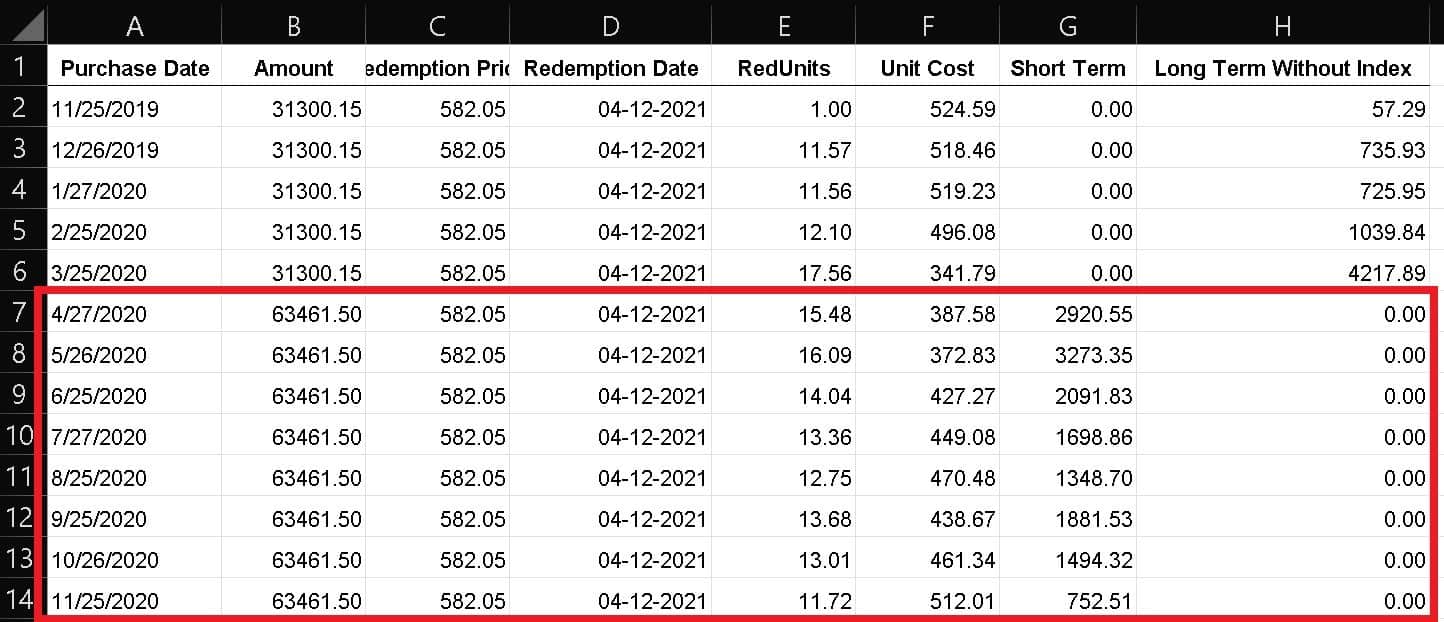
Notice the last two columns – G and H. Some entries correspond to STCG (within the red box) and some to LTCG.
Now among the LTCG entries, check if any of the purchase dates fall on or before 1st Jan 2018. If they do, then grandfathering rules will apply to LTCG. We will discuss this in the second example. In the present case, all purchase dates are after Jan 31st 2018. So no grandfathering rules apply. For an explanation see: Equity LTCG Tax With Grandfathering Explained: Video + Calculator.
If no grandfather is involved then LTCG reporting becomes simple.
LTCG Entries (without grandfathering) to be made in ITR2 or ITR3
- Cost of acquisition: This is the purchase price. To determine this, multiply columns E and F and add them (LTCG entires only rows 2 to 6 in this example). That is, we are multiplying the redeemed units and the unit cost (purchase NAV) and adding them up to find the total purchase prices for LTCG units. This entry may be readily available in the CG sheet but it is better to double-check.
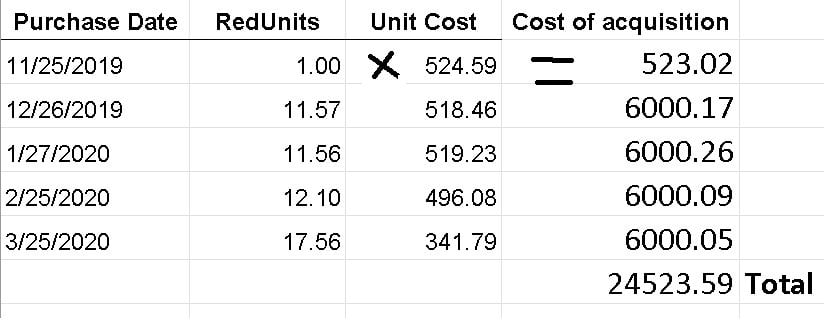
- Full value of consideration: This is the redemption amount corresponding to LTCG. This is Rs. 31300.15 (Cells B2 to B6 all show the same amount in the screenshot).
- Expenditure wholly and exclusively in connection with transfer: Any commissions or brokerage involved. Set to zero if you don’t know. It will not make a big difference to the result.
This is a screenshot from How to enter mutual fund and share capital gains in ITR2 (or ITR3).
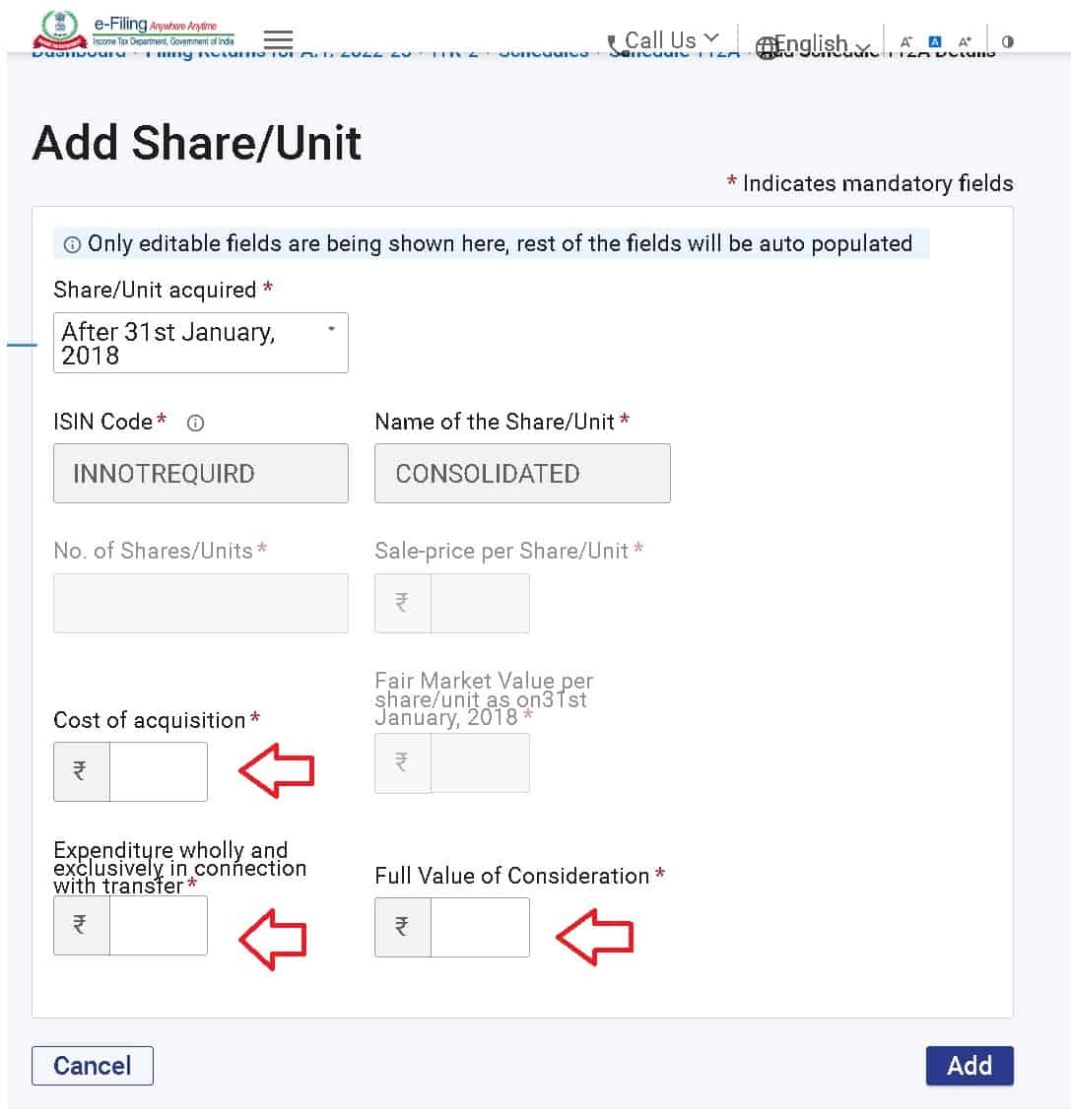
STCG Entries to be made in ITR2 or ITR3
STCG entries are identical to LTCG entries without grandfathering.
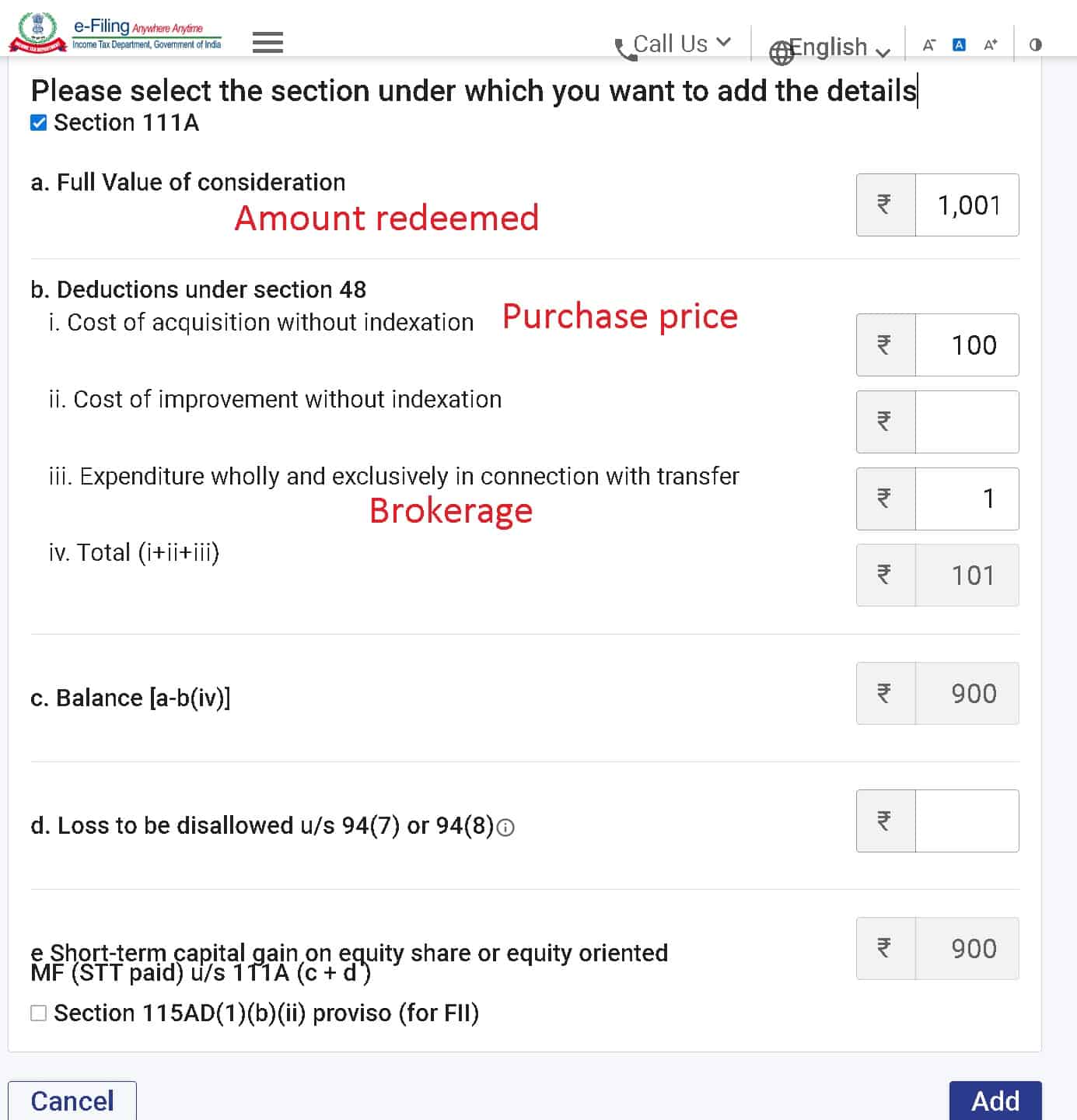
- Cost of acquisition: This is the purchase price. To determine this, multiply columns E and F and add them (LTCG entires only rows 7 to 14 in this example). That is, we are multiplying the redeemed units and the unit cost (purchase NAV) and adding them up to find the total purchase prices for STCG units. This entry may be readily available in the CG sheet but it is better to double-check.
- Full value of consideration: This is the redemption amount corresponding to STCG. This is Rs. 63461.50 (Cells B7 to B14 all show the same amount in the screenshot).
- Expenditure wholly and exclusively in connection with transfer: Any commissions or brokerage involved. Set to zero if you don’t know. It will not make a big difference to the result.
This is a screenshot from How to enter mutual fund and share capital gains in ITR2 (or ITR3).
Example 2: LTCG with and without grandfathering from the same redemption
Let us now consider a case where a single redemption corresponds to both units purchased on/before Jan 31st 2018 (LTCG with grandfathering) and units purchased after Jan 31st 2018 (LTCG without grandfathering).
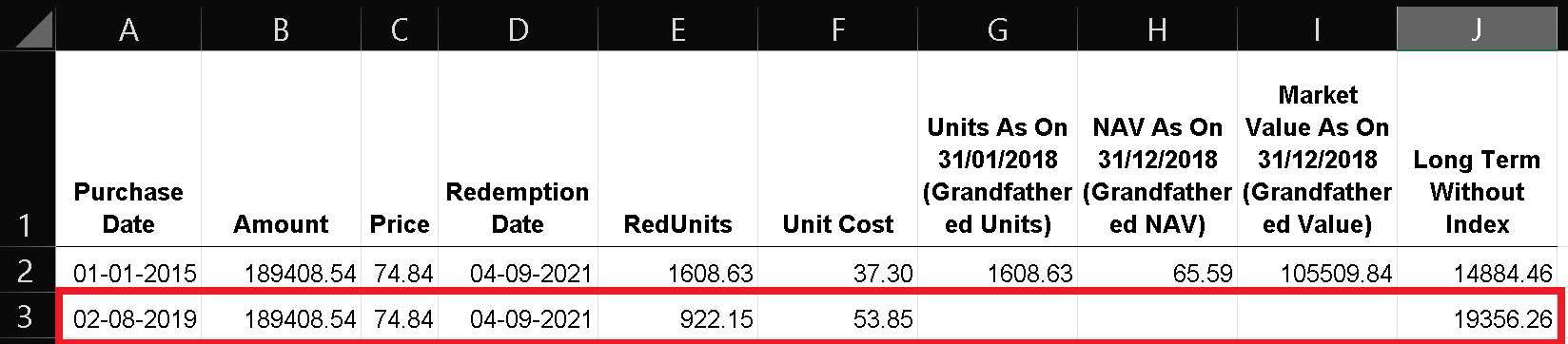
Rs. 189408.54 is redeemed from a fund on 4th Sep 2021. Part of the units redeemed was purchased on 1st Jan 2015 and therefore grandfathering rules will apply when computing LTCG for these units.
The remaining units were purchased on Aug 2 2019. No grandfathering rules apply for these units.
The way in which these are reported in ITR2 or ITR3 is quite different.
Reporting LTCG with grandfathering
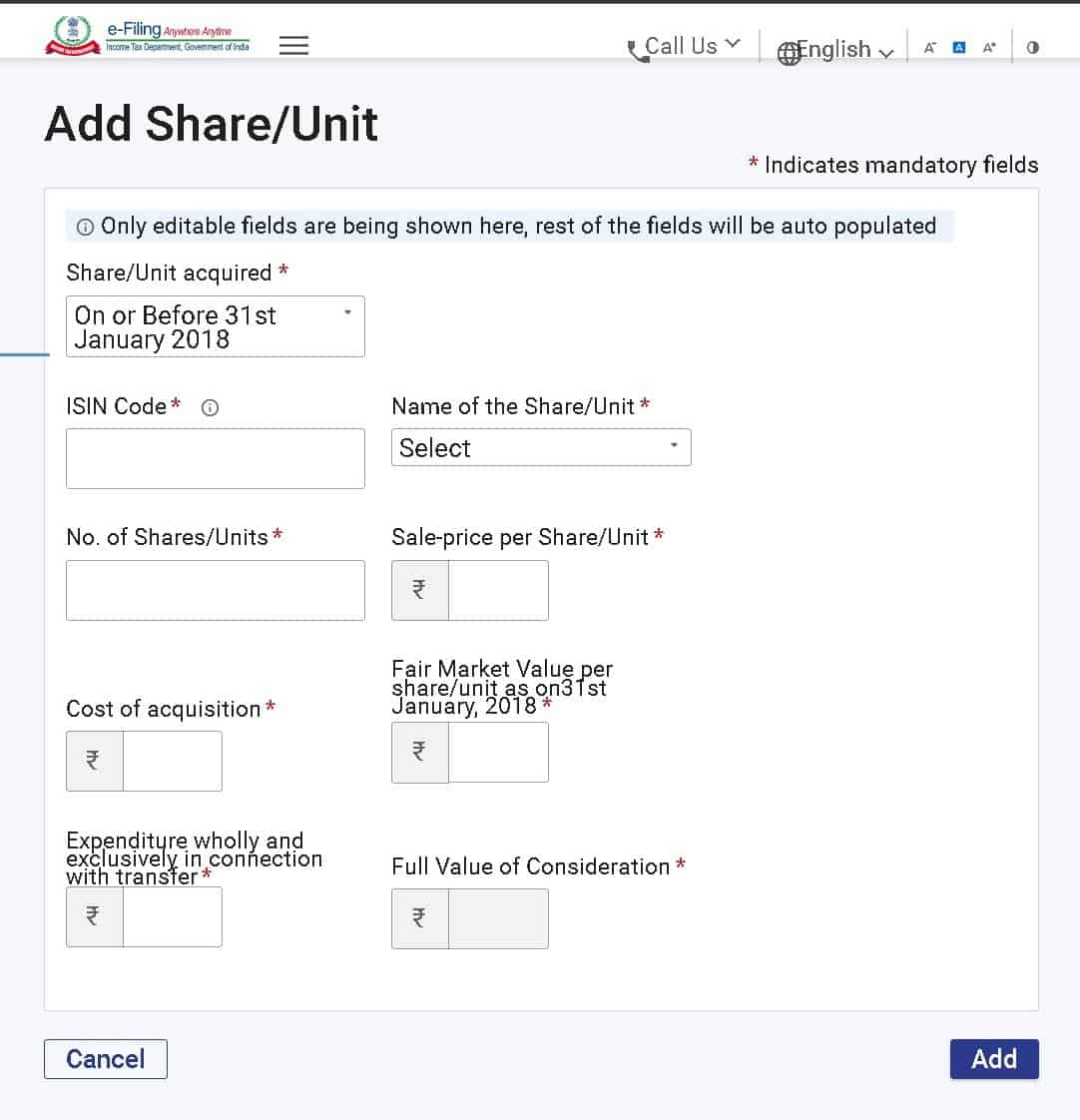
- The ISIN code of the fund (or stock) must be entered. This is available in most CG statements or can be found online. The fund name will then be auto-populated.
- The number of units must be entered: This is usually not found in CG summarised and one must carefully look at all transactions corresponding to a fund and add them up. In the present case, it is just 1608.63 (Cell E2)
- The Sale-price per Share/Unit must be entered. This is Rs. 74.84 per unit (Cell C2)
- The Cost of acquisition: This is cell E2 (redeemed units) X Cell F2 (purchase NAV). For multiple entries, one must sum this product appropriately.
- Fair Market Value per share/unit as of on31st January 2018: This is given in cell H2.
- Expenditure wholly and exclusively in connection with transfer: Brokerage if any. Set to zero if not sure.
- The Full Value of Consideration or the redemption amount will be auto-populated by multiplying the no of units and sale price.
This is a screenshot from ITR2 or ITR3
We have already discussed LTCG without grandfathering above and the arguments for this example are similar.
In summary, we urge taxpayers carefully study all the transactions listed in the capital gains statement and double-check the sale price and cost price with their account statements before entering it into the ITR portal. Filing capital gain reports are cumbersome but with some practice, one will get used to it.