We are happy to announce major updates to the freefincal robo advisor tool. Users can now use custom asset allocation schedules while planning for retirement and other financial goals. The other financial goal sheet has been modified to include a break-up of current investments.
The robo tool is a one-time purchase (details below), and all future updates are free. Therefore, existing users of the robo advisor tool (Excel and Google sheet editions) will be sent links to download the latest version.
One of the main USPs of the robo tool is the automated asset allocation recommendation feature. This is based on our extensive research and is meant to reduce the sequence of returns risk in investing (a set of poor return years from equity).
Thus, portfolio de-risking is taken into account from day one of the financial plan creation and the appropriate investment amount for the goal is then calculated. See, for example, a screenshot below.
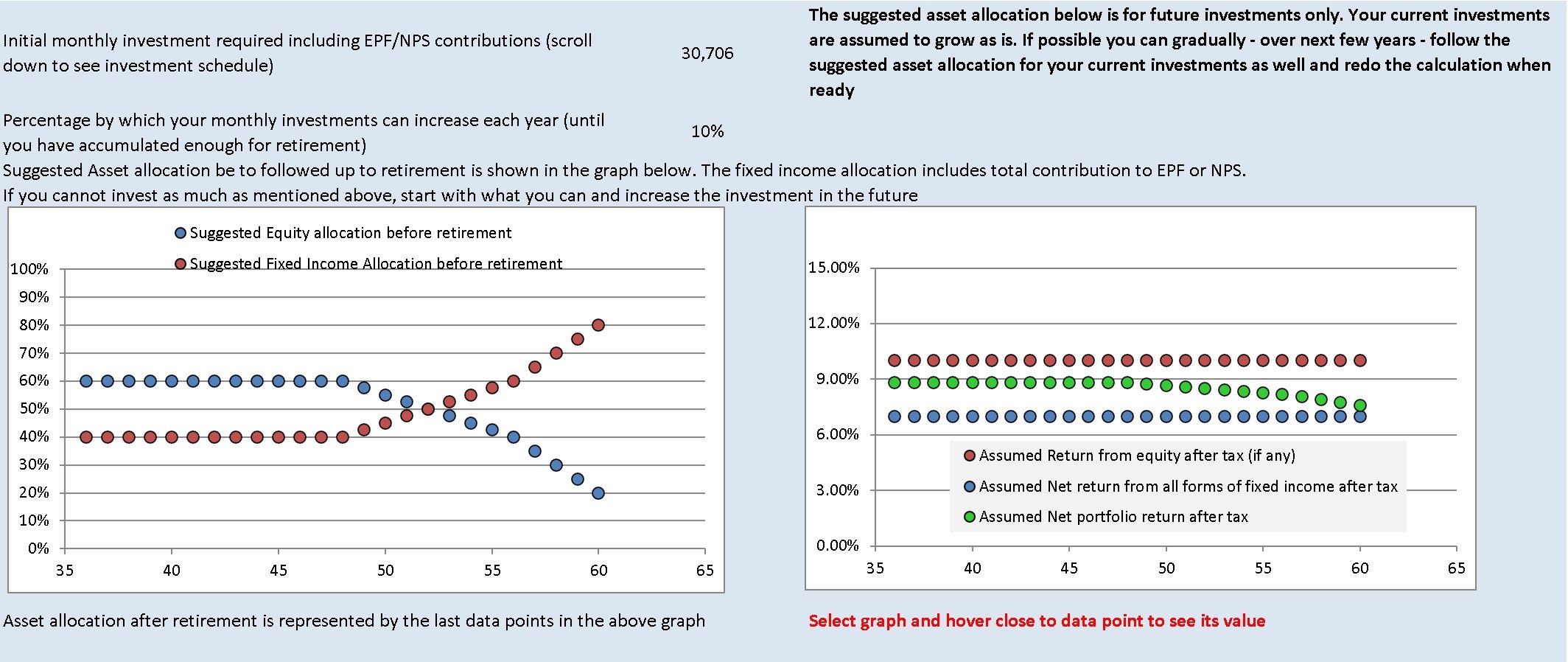
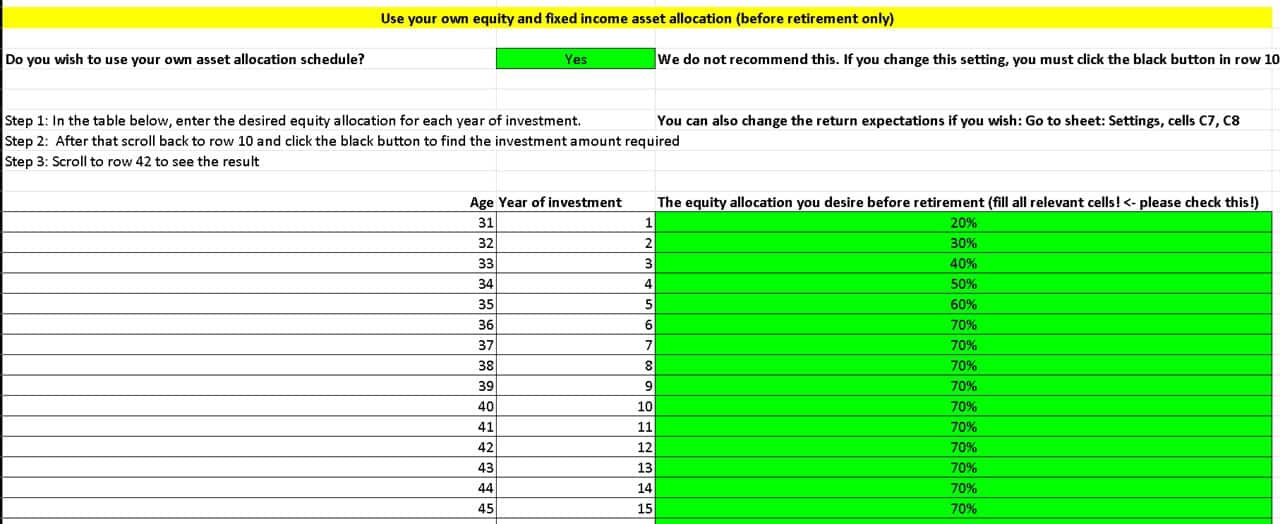
Many users, especially financial advisors who make financial plans using the tool, have asked us for custom asset allocation schedules. For a 15-year goal (as an example), the user should be able to decide how much equity should be in the portfolio in each investment year. We have now included this feature for retirement and other financial goals.
🔥Secure your future with our Robo-advisory tool trusted by over 3,500 investors and advisors. From effortless retirement planning to funding your children’s biggest dreams, turn your financial goals into reality. 🔥
Subscribe for money management solutions via email! (Link takes you to our email sign-up form) Join 32,000+ readers in our community.
👉 New Tool Alert! NaviPlan: A Privacy-Focused Multi-asset Tracker and Goal Planner 👈
The automated asset allocation schedule is the default mode. Customising this is now an option. We do not recommend changing the asset allocation schedule unless it is required.
We recognise that a custom schedule will be useful in many cases, especially for older investors with fixed-income heavy portfolios. For example, investors can now create a plan with an increasing equity allocation schedule. Hold it constant for some years and then decrease it, as shown below.
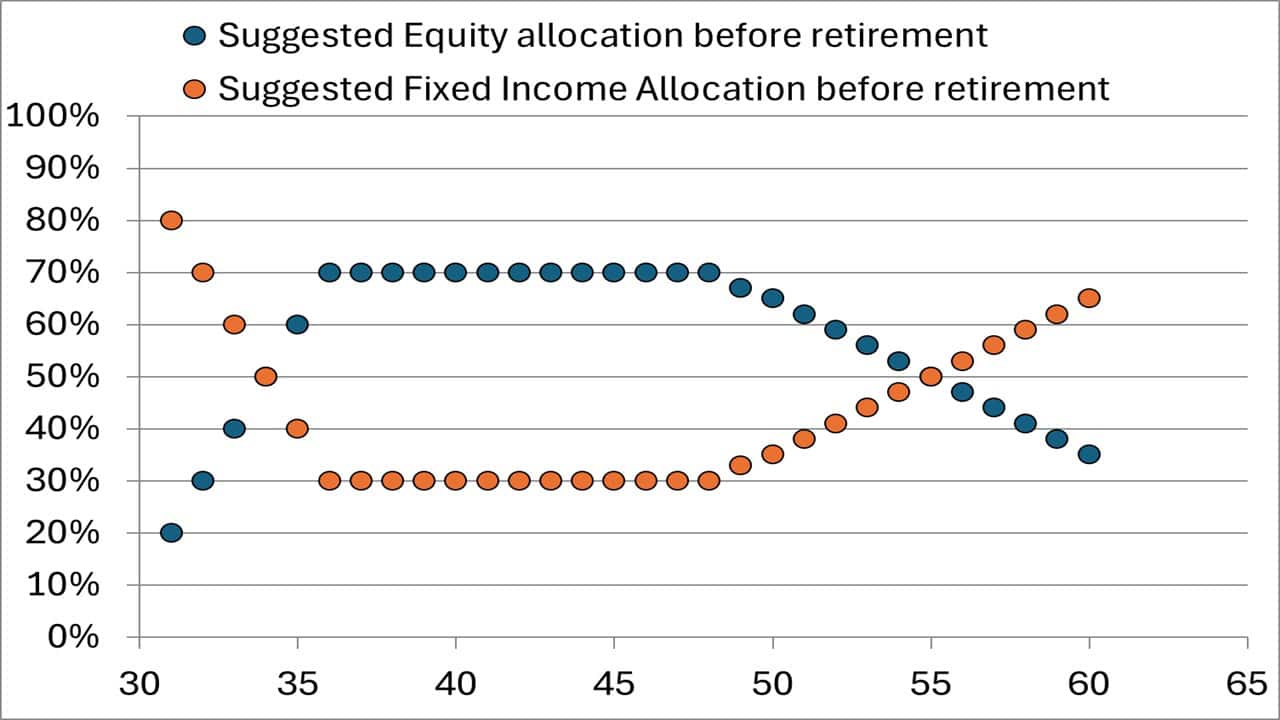
We recommend that only financial advisors and experienced DIY investors use this option. For most users, the automated schedule the robo tool provides will satisfy their requirements.
This is a screenshot of the custom asset allocation schedule in the freefincal robo advisor tool for retirement. Similar schedules are also available for other financial goals.
Update 2: Users can now enter details of their current investments in the other financial goals sheet. This was earlier available only for retirement. Thanks to SEBI RIA Basavaraj Tonagatti for suggesting this.
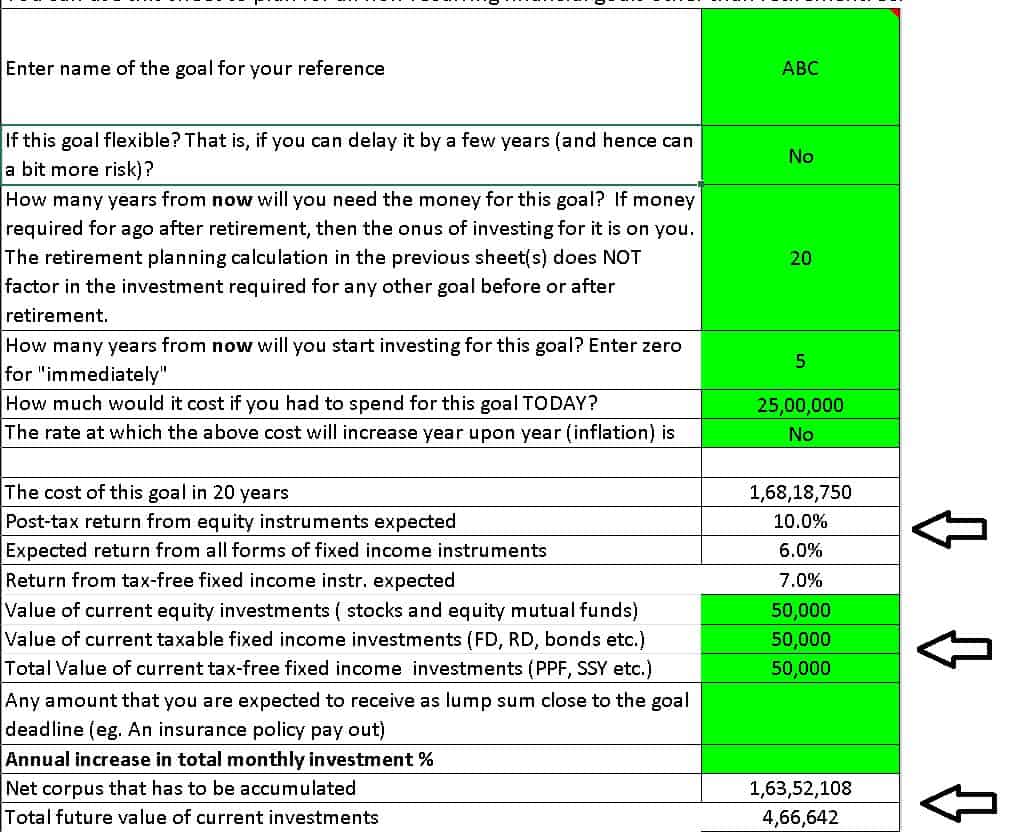
We believe these updates place more power in the hands of the user to create detailed financial plans for themselves and their clients.
Features of the Robo advisor tool
The tool would help anyone aged 18 to 80 plan for their retirement, six other non-recurring financial goals, and four other recurring financial goals with a detailed cash flow summary.
Retirement planning capabilities (illustrations are linked below)
- Can handle up to three post-retirement income streams
- Automated asset allocation schedule to reduce sequence of returns risk (poor returns that can derail our plans)
- Detailed bucket strategy calculation
- Options to include various levels of pension after retirement (income flooring)
- Option to DIY bucket strategy and use an annuity ladder.
- Fully customisable. No hidden formulae.
All the details are explained here: Robo Advisory Software Tool: Build a complete financial plan!
This is a video guide.
More than 2500 investors and financial advisors are using the tool. The tool was recently featured in the Economic Times: Meet Pattabiraman, the man who helps many plan a better retirement through his calculators.
- All inputs are fully customisable.
- It can be used for commercial/professional use as well. Many advisors use this to create financial plans for their clients.
- Users will get all future updates.
Presentation: The tool is available in two formats
- As an Excel file with macros. It will work on Mac Excel and Windows Excel.
- Or on Google Sheets with scripts.
All inputs are fully customisable. It can be used for commercial purposes as well. More than 2500 investors and financial advisors are using the tool. Users will get all future updates as well.
One-time purchase; lifetime access. Price includes future updates to the sheet.
Get the robo tool by paying Rs. 5625 (Google Sheets edition; Instant Download. No refunds allowed). Use the discount code: robo25
Use this link to get the tool to get the Robo Advisory Template Excel Sheets Edition at a 20% discount for Rs. 4500 only (the regular price is Rs. 5625). Use the discount code: robo25 (this will work on Mac and Windows Excel)
Outside India? Then use this Paypal link to pay USD 80 (Kindly write to freefincal [AT] Gmail [DOT] com after you pay).
Retirement planning Illustrations made with the robo tool:
- Retirement plan review: Am I on track to retire by 50?
- I am 30 and wish to retire by 50 how should I plan my investments?
- Can I retire by age 55? Retirement Planning Case Study
- Case Study: Achieving Financial Freedom for Early Retirement
- How should I plan if I want to retire in 20 years?
- Is it possible to combine a bucket strategy with income laddering after retirement?