Last Updated on August 30, 2021 at 4:15 pm
Use this tool to automatically screen mutual funds based on returns and create a shortlist of consistent performers. The updated version corrects a bug and now includes Benchmark 1 to 12 year CAGRs.
The tool grabs annual returns data from value research for different categories and calculates
- 12,11,10,9,8,7,6,5,4,3,2 and 1 year returns (CAGR corresponding to lump sum investments)
- Readers who use the mutual fund selection guide in particular, How to select an equity mutual fund – Creating a shortlist will realise that VR online had removed the 7-year return option. Hopefully, this sheet will remove that dependence on VR for Excel users.
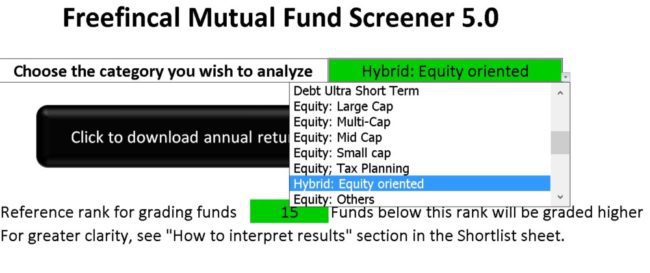
- The user can input a reference rank, say 15. Then the number of times, funds have got a return rank below 15 is computed and consistency score is evaluated. Call this shortlist-1
- Alternatively, funds which have consistently beat category average for 1,2,3 …12-year returns is also computed. Call this shortlist-2
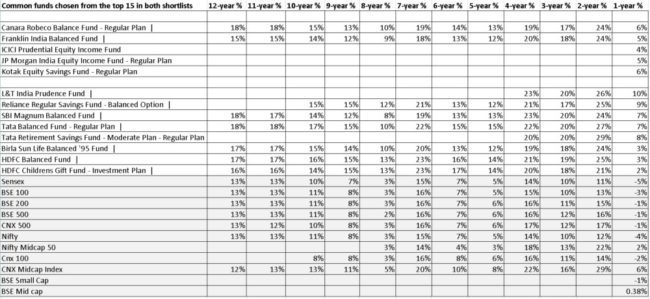
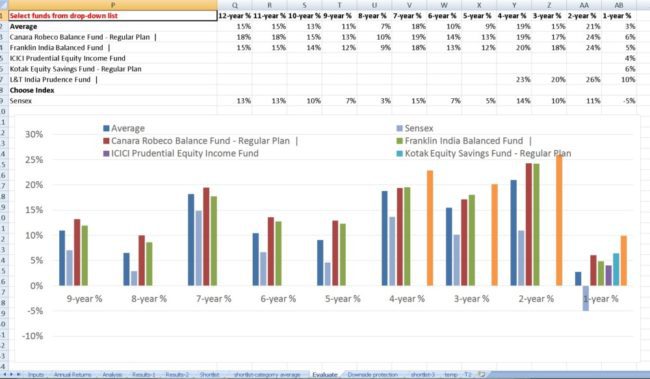
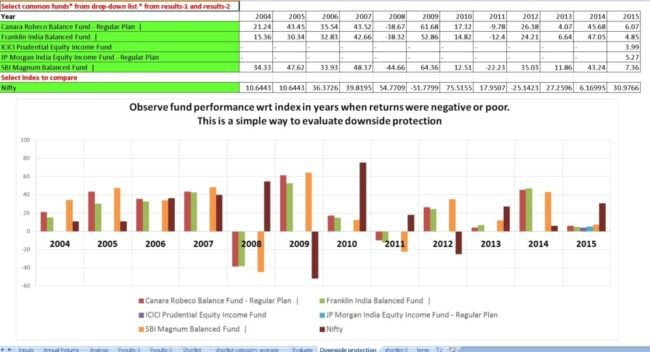
- The funds common to both shortlists can then be further evaluated with benchmarks.
- The number of times the funds annual returns were above category average annual returns is also computed. Call this shortlist-3
- The user gets a list of consistent performers in terms of peer rank in about 15-20 seconds!
Screenshots
How to use video: How to select an equity mutual fund in 30 minutes!
🔥Secure your future with our Robo-advisory tool trusted by over 3,500 investors and advisors. From effortless retirement planning to funding your children’s biggest dreams, turn your financial goals into reality. 🔥
Subscribe for money management solutions via email! (Link takes you to our email sign-up form) Join 32,000+ readers in our community.
👉 New Tool Alert! NaviPlan: A Privacy-Focused Multi-asset Tracker and Goal Planner 👈
Note:
- This screener is meant to be used while choosing a new mutual fund and not for performance evaluation.
- The return that you have got will be quite different from the annual returns used here.
- This is a method to create a shortlist and not ch0ose funds.
- The risk associated with consistent performance will have to be separately evaluated.
- I suggest that you calculate the downside risk for the funds in your shortlist with this tool: Mutual Fund Downside Protection Calculator and choose a fund with a consistently low downside capture ratio.
- Alternatively, the Mutual Fund SIP and Lump Sum Rolling Returns Calculators can also be used.
- Although the standard past performance disclaimer applies, there is merit in using this method because of these results: Mutual Fund Investing: Does Past Performance Matter?
Note: VR has made it necessary to login to see returns. Therefore, please do the following:
- Open blank excel
- Select Data in the menu
- Click get external data and then from web
- Excel will open an internet browser-like window (basically a box where you enter a url) and there will be annoying script error messages. Dismiss them.
- Then Go to VR online in that window and go to the main page. There will be annoying messages. Dismiss them.
- Click on login. If you are not able to do so. Stop the page from downloading and then click login
- Login with your email (preferable) and click on remember me.
- Now you can exit the browser window and start using the screener. It should work fine now.
Update: July 2018: Version 7 All latest versions are here: Download New Versions: Mutual Fund Lump sum & SIP Screeners
Download Version 6 of the screener (Aug 2016 for windows Excel)
Download the freefincal mutual fund screener (May 2016 windows Excel)
Download the Mac Excel freefincal mutual fund screener (May 2016 Mac Excel)
A google sheets edition without some features is also available Mutual Fund Screener- Google Sheets Edition
Change log
Download the Automated Mutual Fund Screener (Jan 2016)
Thanks to Jignesh Bhavishi for pointing out a mistake (now corrected)
As suggested by Manoj Kumar Idam, instead of shortlisting with CAGR, the annual returns are used. This ensures the each data point is independent of each other.
Update: Version 3.1
Recent changes to VR categories have been incorporated.
The Equity: Mid and Small Cap Category has been split into Equity: Mid Cap and Equity: Small Cap. Anish Mohan pointed out this change earlier. When he did, the Excel data query was not affected. Now, the change has been incorporated and this update is necessary. Thanks Anish.
Thanks to Omkara V. Balapa for pointing out a mistake (now corrected)
Thanks to Rajnish Ahuja for pointing out a mistake (now corrected)